
I’ve been using Kit email marketing automation to drive sales for 14 years. In that time, I’ve generated millions in revenue—largely in part to these systems.
It’s not just email marketing. But my understanding of email distribution, automation at scale, and personalization at scale has been a major driver in generating those results.
Industry leaders like Nathan Barry (CEO of Kit) and Brennan Dunn (CEO and founder of RightMessage) have recognized my email marketing and personalization expertise. I’ve also appeared on the Smart Passive Income Podcast with Pat Flynn talking about building remarkable email marketing systems.
But what I’m most proud of is what my clients say about the value I provide. That’s what really matters.
What Personalized Email Marketing Actually Means
When I talk about personalized email marketing systems, I’m talking about marketing where every touchpoint is personalized to the person reading.
Not just using their name in an email.
I mean your entire marketing adapts to who they are, where they are in their business, what they’ve purchased, and what they actually need right now.
From your welcome sequence to what offer they see, how it’s pitched to them, your ongoing evergreen newsletter (also known as a nurture sequence), and even your website—everything is consistent and personalized.
This is a win-win for both you and your subscriber.
They get the most value because your message is relevant to them. You get better conversions because you’re showing them what actually matters to them at the right time.
And all of this runs automatically in the background.
That means my clients can focus on their actual work—serving their customers, creating content, running their business or nonprofit—while the marketing system handles personalization at scale.
Watch The Complete Technical Walkthrough
I recorded a detailed 36-minute walkthrough showing exactly how I build these systems in Kit. You can watch it here, then read the breakdown below—or vice versa.
In this walkthrough, you’ll see:
- Live screen shares of actual Kit automations
- How custom fields, liquid code, and visual automations work together
- The exact logic behind audience glossary, lead scoring, and pitch cycles
- Real examples from my own business and client accounts
You can watch and follow along, or jump straight into the written breakdown below.
Who I’ve Built These Systems For
I’ve built these Kit automation systems for countless creators, coaches, business consultants, nonprofits, HR professionals, and executives. Each one is customized to their industry, their audience, and how they sell.
This is a detailed walkthrough of how I build these personalized email marketing systems using Kit and RightMessage. I’m pulling back the curtain to show you the level of strategy, planning, and intelligence that goes into smart email marketing automation across different industries, segments, and personalization tactics.
Why I’m Showing You This
I’m not showing you this so you can do it yourself. I actually advise against DIY for most established businesses.
Here’s one of my key qualifiers: If you’re not in your own way yet, then you’re not ready to work with me.
If you’re still DIYing things but you’re at a stage where you definitely shouldn’t be—and it’s costing you greatly—that’s when we work together.
If you’re a new creator in the DIY stage, that’s fine—my agency services aren’t for you yet. But if you’re doing $250K+ and you want this level of sophistication, that’s where we come in.
(We do occasionally offer cohort workshops where we guide people through building a simpler version of this system. But the full Authority Engine methodology in this walkthrough is what my agency clients get.)
Let’s get into it.
What I Do
For 14 years, I’ve run a family-first business providing mentorship to solopreneurs, creative entrepreneurs, designers, copywriters, small studios, and agencies.
The mentorship is where I share my lessons—available as a monthly or annual membership. There are also courses from earlier seasons of my career, but they’re not actively promoted anymore.
My done-for-you services fall under Creator Engines. Two offers: Newsletter Engine or Authority Engine.
Newsletter Engine builds out your smart automated personalized newsletter—welcome sequence, pitch sequence, evergreen newsletter, repitch loop, and all the smart automations that happen automatically in the background.
Authority Engine includes the full website (design or refresh) focused on conversion optimization, plus RightMessage personalized survey design and implementation to gather data and segment your audience so we can personalize both your newsletter and your website.
I build the entire strategy, implement it, launch it, and refine it over time.
The Foundation: Email Segmentation and Product Ladder Mapping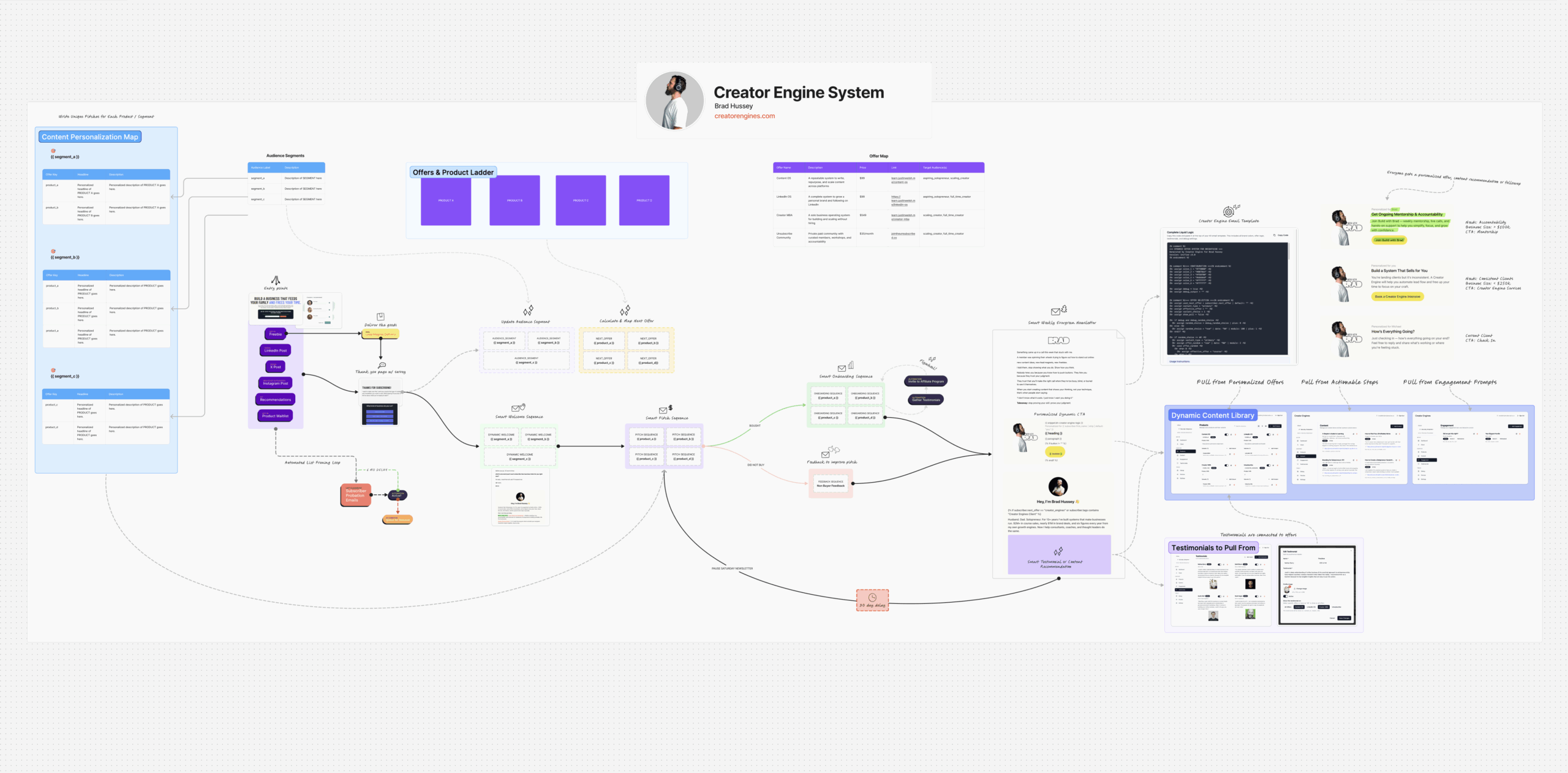
Before I build anything in Kit, I lay the foundation.
Everybody has an offer and product ladder. It might be an ascension ladder where you buy product A, then your next offer should be C, then D. Maybe it’s services. Maybe it’s a mix. Maybe it’s just two products. Maybe it’s a course, coaching, and a continuity offer like a mentorship or community.
For me, I have the mentorship (an ongoing offer) and I have services. I also have smaller offers like playbooks, mini courses on things like email marketing, positioning, pricing, freelancing, client acquisition.
We figure out the offers that map to your audience segments.
In your audience you probably have two or three high-level segments. Maybe beginners, intermediate, advanced.
For me it’s:
- Freelancers who are just getting started
- Small studios and agencies who are established and need to scale
- Established business owners who are time-poor and cash-rich to some degree and need their marketing completely done for them
That maps to offers.
Segment A might need to be mapped to product A, and then you pitch it to them in a unique way.
For freelancers, you would say “this is how you get started, join the mentorship.”
For somebody who’s more advanced, you would say “get the accountability you need to scale to a million.”
Same offer. Different way of pitching it.
This email segmentation strategy is the foundation of everything that comes next.
Creating Entry Points and Gathering Data
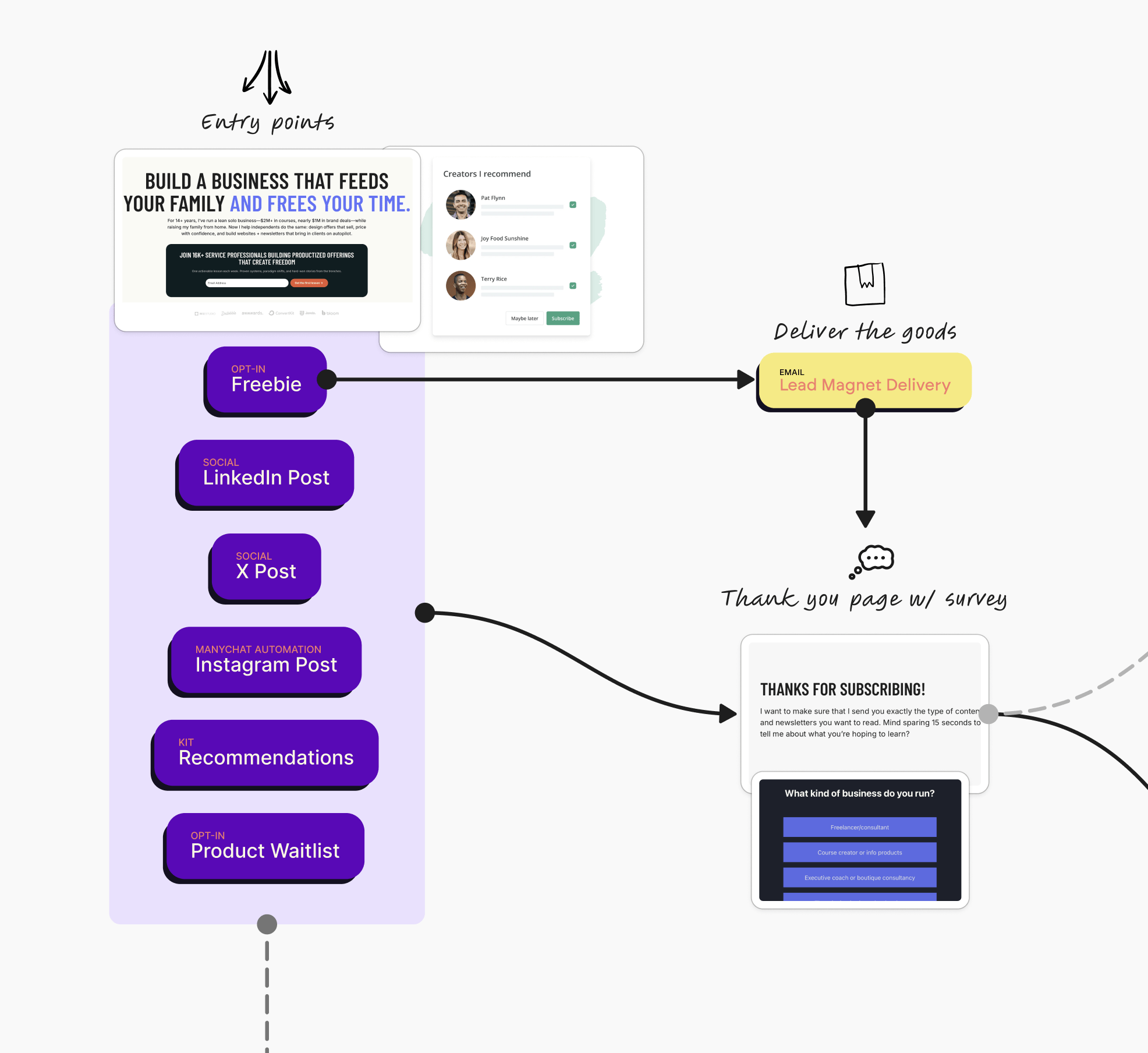
Entry points are how people join your email list. That might be lead magnets, freebies, LinkedIn posts, content, ads, Kit recommendations, or your creator profile.
We install the RightMessage survey on the thank you page and throughout the website.
Here’s how it works: You deliver the goods in the lead magnet format (a PDF, video, checklist, whatever). The thank you page shows the RightMessage survey where we gather data about who they are and what they need. RightMessage integrates deeply into Kit, so that survey data flows directly into their Kit profile as custom fields.
When someone joins, they’re already added to an automated list pruning loop. It’s not just a static list or standard cold subscriber automation. It’s always running for every single subscriber. We’re always checking to see if they’ve been engaged over the last 30-180 days.
If they fail to meet that criteria, we add them to a probation email that checks “hey, you still want to be here?” If not, we’ll flag them to be unsubscribed. If they do pass, they go back and restart that loop.
We’re always maintaining a check to see who’s active, rather than just relying on Kit’s cold subscriber tag. We want to have re-engagement loops and true cold subscriber identification.
What Happens Behind the Scenes
From the moment someone subscribes, Kit automations are working to personalize their entire experience based on their survey data and behavior.
Gathering Data and Calculating Offers
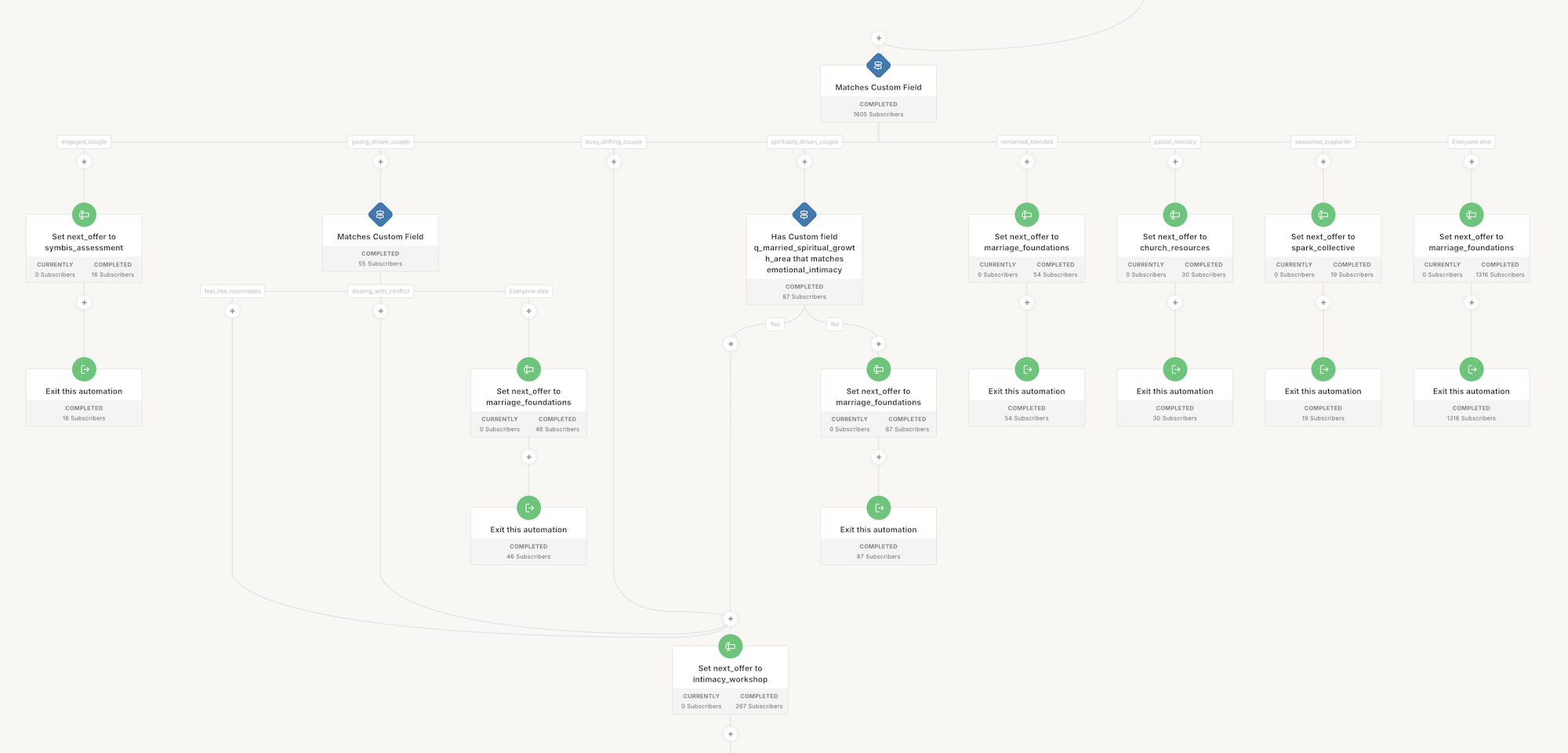
When they join and enter their data in the survey, we gather their audience segments and their needs.
Then we calculate and map their next offer.
You might be an entrepreneur doing a million dollars a year, so you need product D (the done-for-you service). The wording gets personalized and mapped to your custom fields.
This happens with Kit automations, with liquid code in the email templates, and using RightMessage.
Updating as People Grow
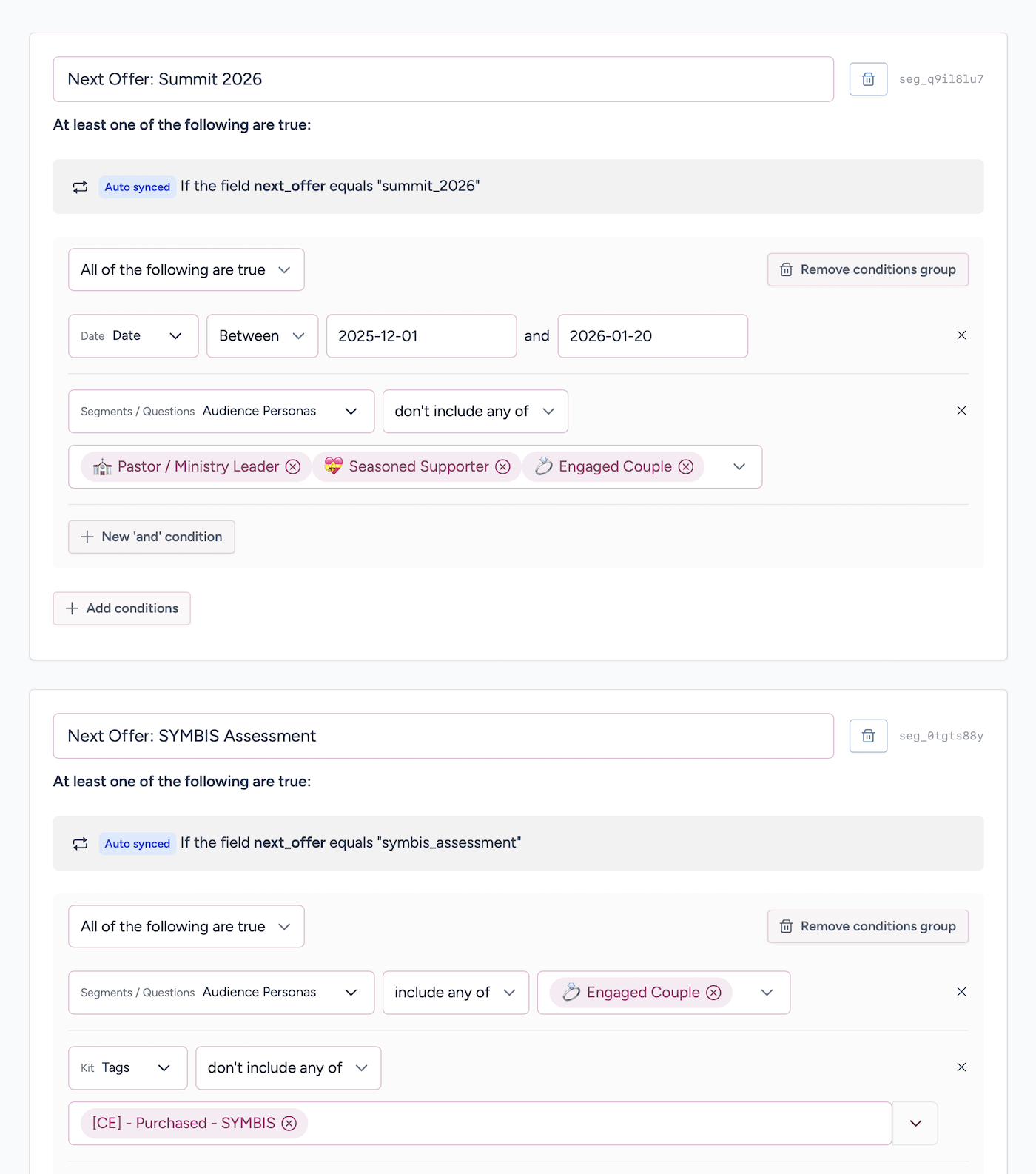
If you ever ascend in your segments, the system knows. Now you’re not a freelancer, you’re full-time and doing $500K a year. Your needs, wants, goals, pain points, audience segment, and offer all get updated.
If you purchase an offer, the system ascends you up the product ladder so you’re not being pitched the same thing all the time.
The system also ensures you don’t get tired of the same offer. When we’ve pitched you that offer once, twice, three times, we can toggle to different offers.
The Silent Background Work
All of this happens in the background when you join. Offer calculation, segmentation calculation, personalized content, personalized copy, links—everything.
It’s always polling and watching.
Then you just get a welcome email. You don’t see any of the background stuff.
“Thanks for joining. Here’s your lead magnet.”
Depending on your segment, your needs, your content preferences, where you came from, what you downloaded—the welcome email is personalized to you.
Human-first marketing. Human-first email. Human-first content.
That’s how I approach it. That’s what my business is all about. Personalized, human-first marketing.
The emails talk to the person.
If you told us you struggle with this, and you want to achieve this, and here’s where you’re at right now—all of that gets integrated into the copy. Every word is written and personalized to you.
Your welcome email sounds like I wrote it to you personally. Because in a sense, I did.
The Smart Pitch Sequence: Personalized Email Marketing in Action
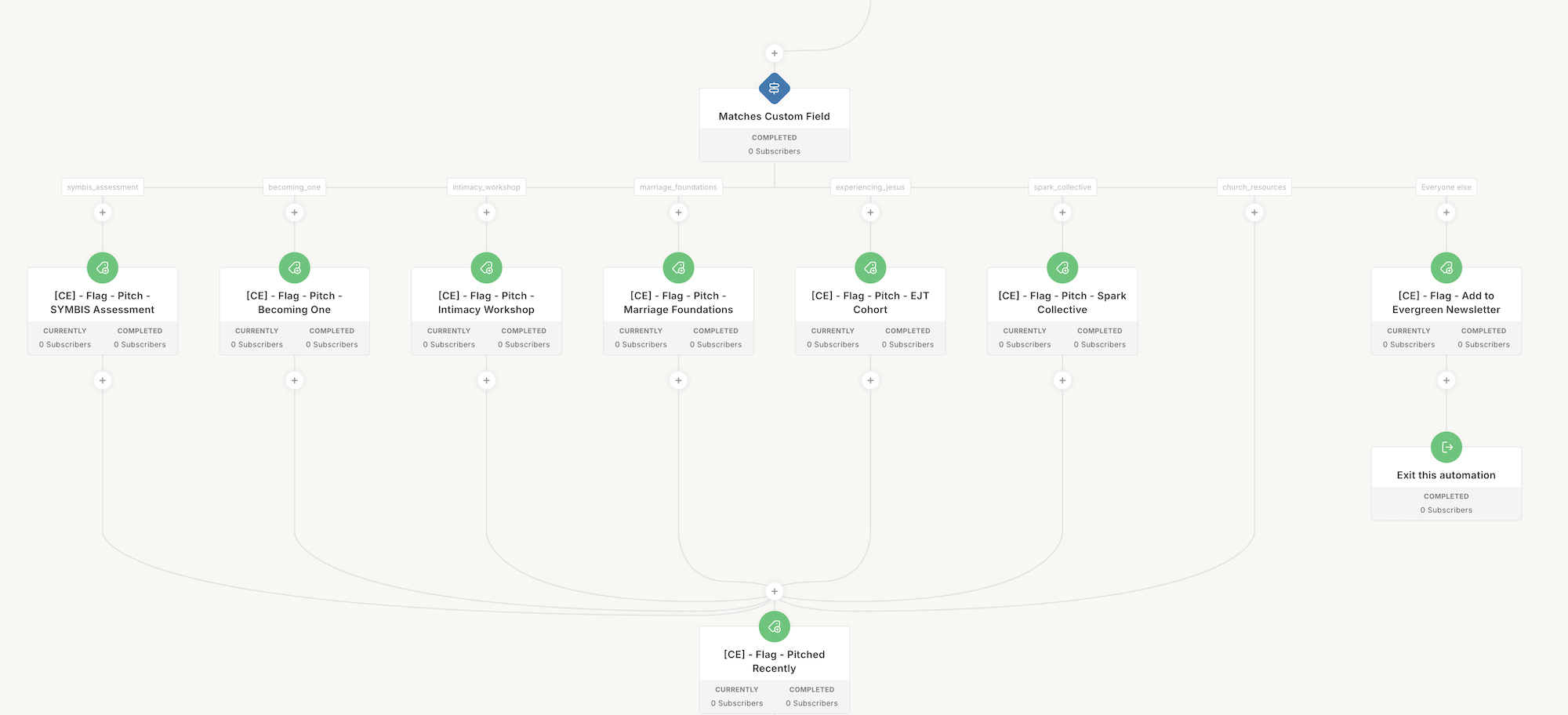
The following week you get a pitch sequence.
This is dynamic depending on your offer. It checks to see what offer this person should receive based on their segmentation data and what we’ve calculated.
If we know that, we send you product A, B, C, or D. Whatever your product offer ladder is.
I find out: this needs to be a Creator Engine client, let’s pitch them Creator Engines and get them on a call.
Or: this is a new freelancer, they need to start the mentorship program and let’s throw in a 7-day free trial because they’re probably tight on cash. We want to convince them to stay.
Or if they’re more advanced: they’re doing fine, let’s pitch them the annual membership to get them committed and get more cash flow up front.
That’s the smart pitch sequence.
Almost everyone gets their own personalized offer. You might get product A, B, C, or D, but it’s pitched in different ways.
There are many moving parts that assemble a dynamic email just for you.
If They Buy
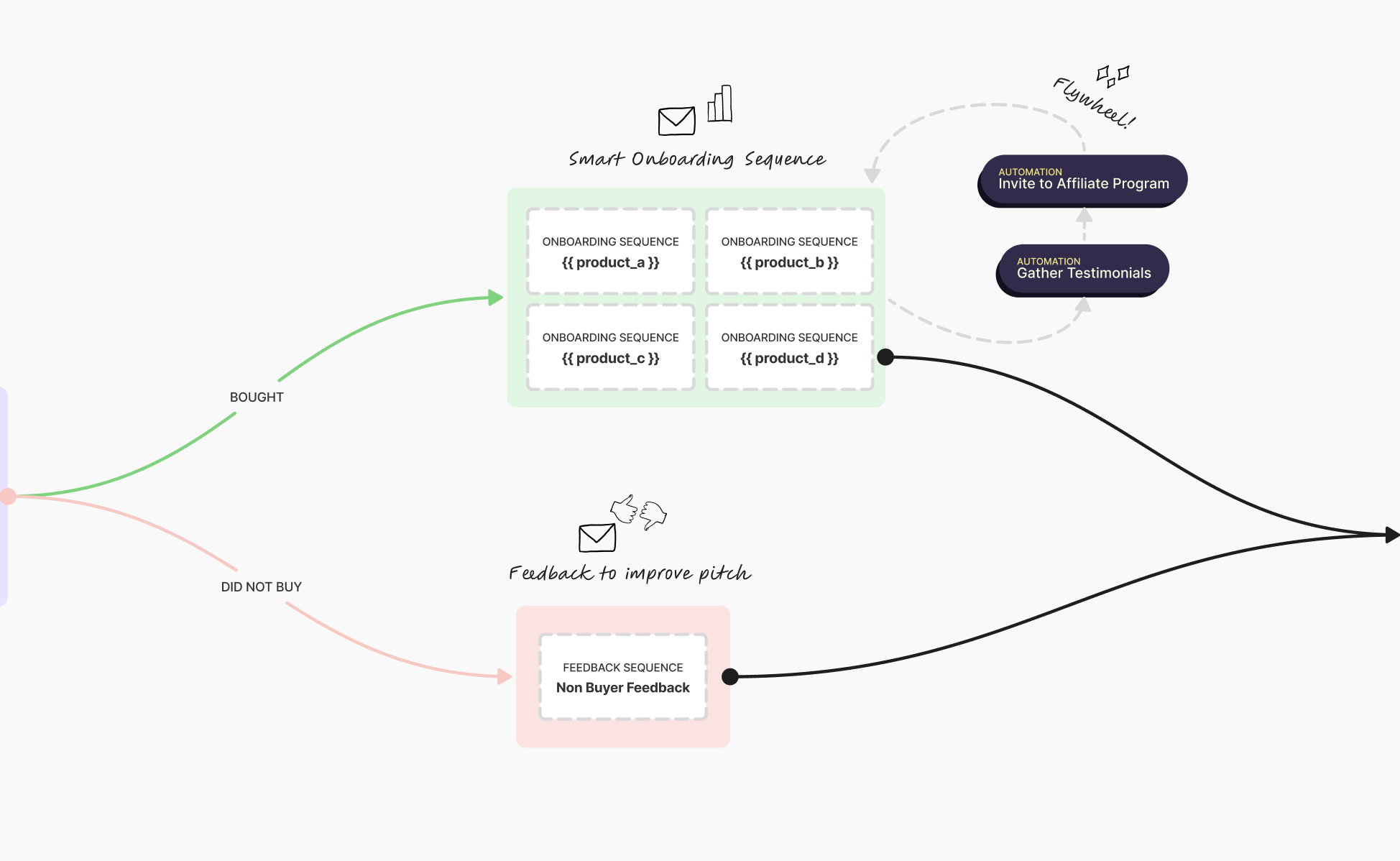
If they buy, they get onboarded for product A, B, C, or D.
The onboarding runs a little flywheel in the background. The system gathers testimonials and puts them in a loop. Check-ins happen maybe a month later, two weeks, whatever the timeline is.
Senja and some automation add those testimonials dynamically so they show up in pitch emails to improve future conversions.
Some clients also get invited to an affiliate program. Now that you’ve joined, tell your friends, get some rewards. It’s a flywheel.
If They Didn’t Buy
We send them to a non-buyer feedback automation. That might also be a rescue sale sequence depending on how aggressive you want to be or how necessary it feels.
If it feels right: “Hey, sounds like you struggled with the pricing of the offer. Here’s a deal. Try it out for a month for free or 50% off for your first payment.”
The Evergreen Newsletter: Automated Email Marketing That Runs on Autopilot
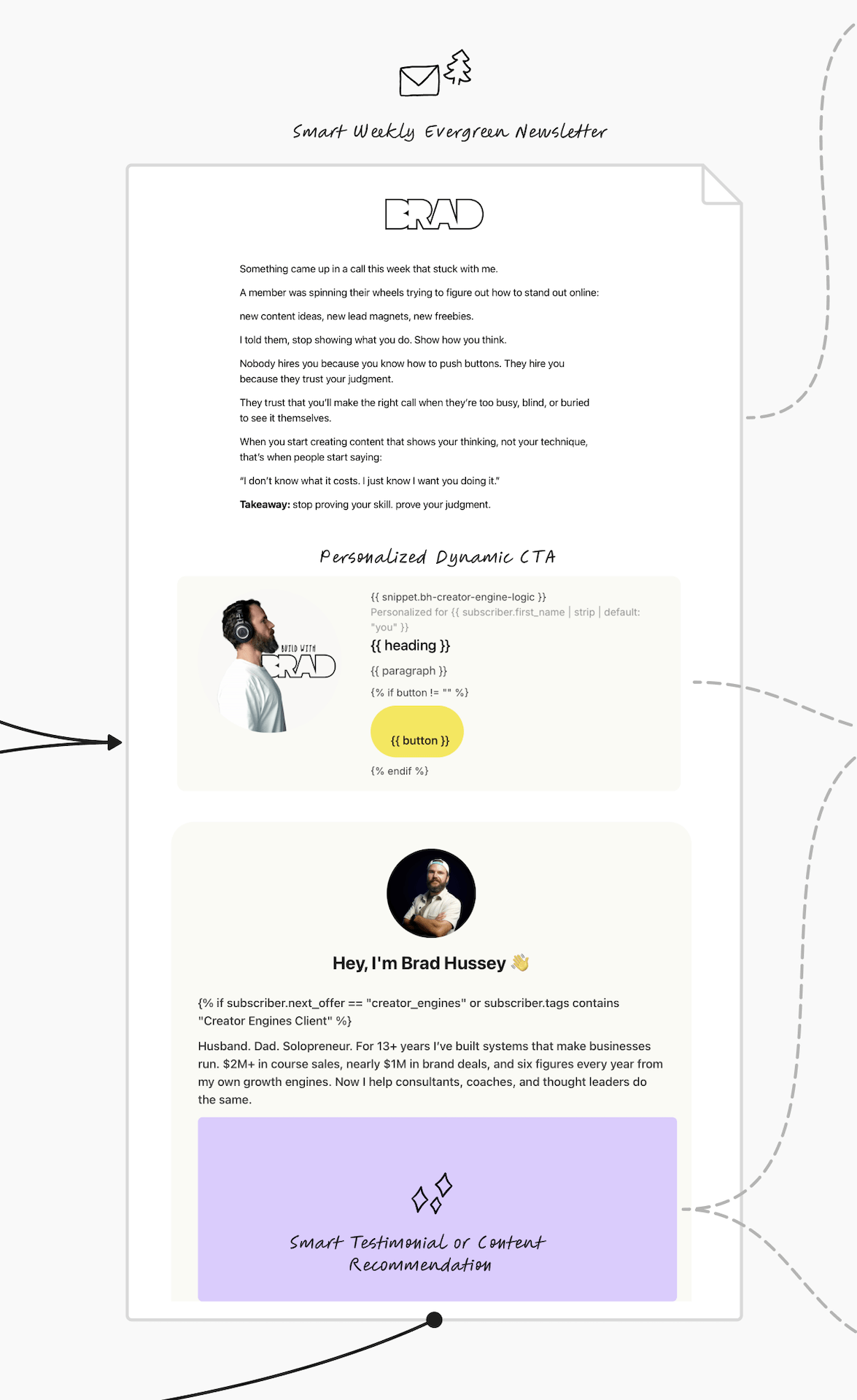
After the pitch, smart onboarding, and/or the non-buyer feedback or rescue sale sequence, subscribers drop into your evergreen newsletter.
Your smart weekly evergreen newsletter. Also known as a nurture sequence.
How the Evergreen Newsletter Works
It sends automatically every week, clockwork, without you needing to hit broadcast send. You shouldn’t have to do that.
It’s your best content curated and assembled, partially dynamic.
Each email has a personalized dynamic call to action. This block understands who’s reading and personalizes what they should see in terms of a call to action, a testimonial, a next offer, a variation on an offer, just checking in, suggested next steps.
Anything can go here.
Building Dynamic Content Libraries
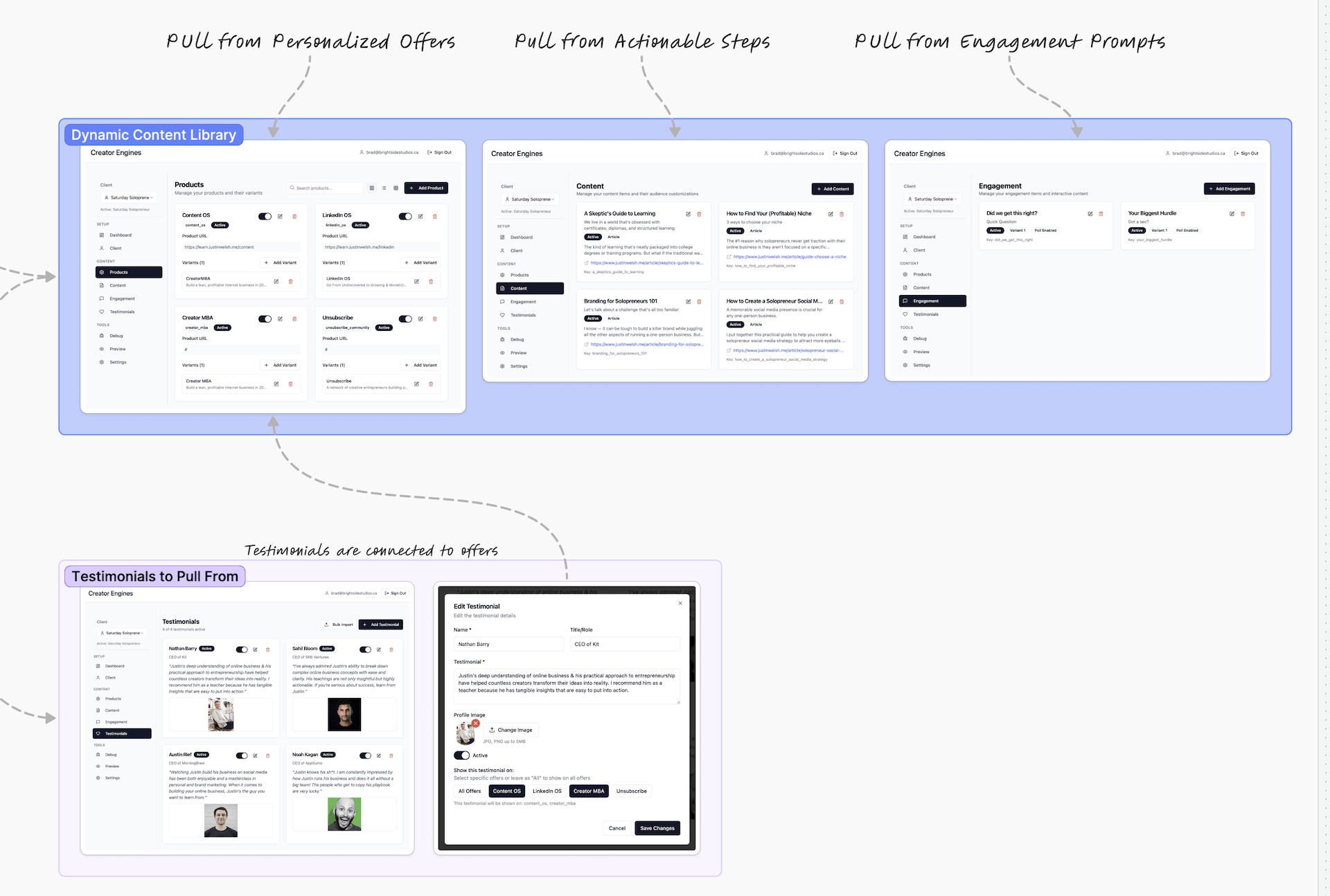
Often I’ll create a dynamic content library. That’ll be your products. Maybe you have those four products. You have 12 pieces of content or 12 interviews. You have some engagement checking in “hey how are things going?” And some testimonials.
Some of my clients in the human resources and leadership space have insights they want to share based on certain topics. Topics like leadership, culture, and safety in the workplace. They want to share four insights from each.
If they’re reading an email on the leadership category, the system pulls one of these four or five leadership pieces and displays it dynamically.
This can happen dynamically, randomly, on a sequence, or based on seasons.
Seasonal and Contextual Personalization
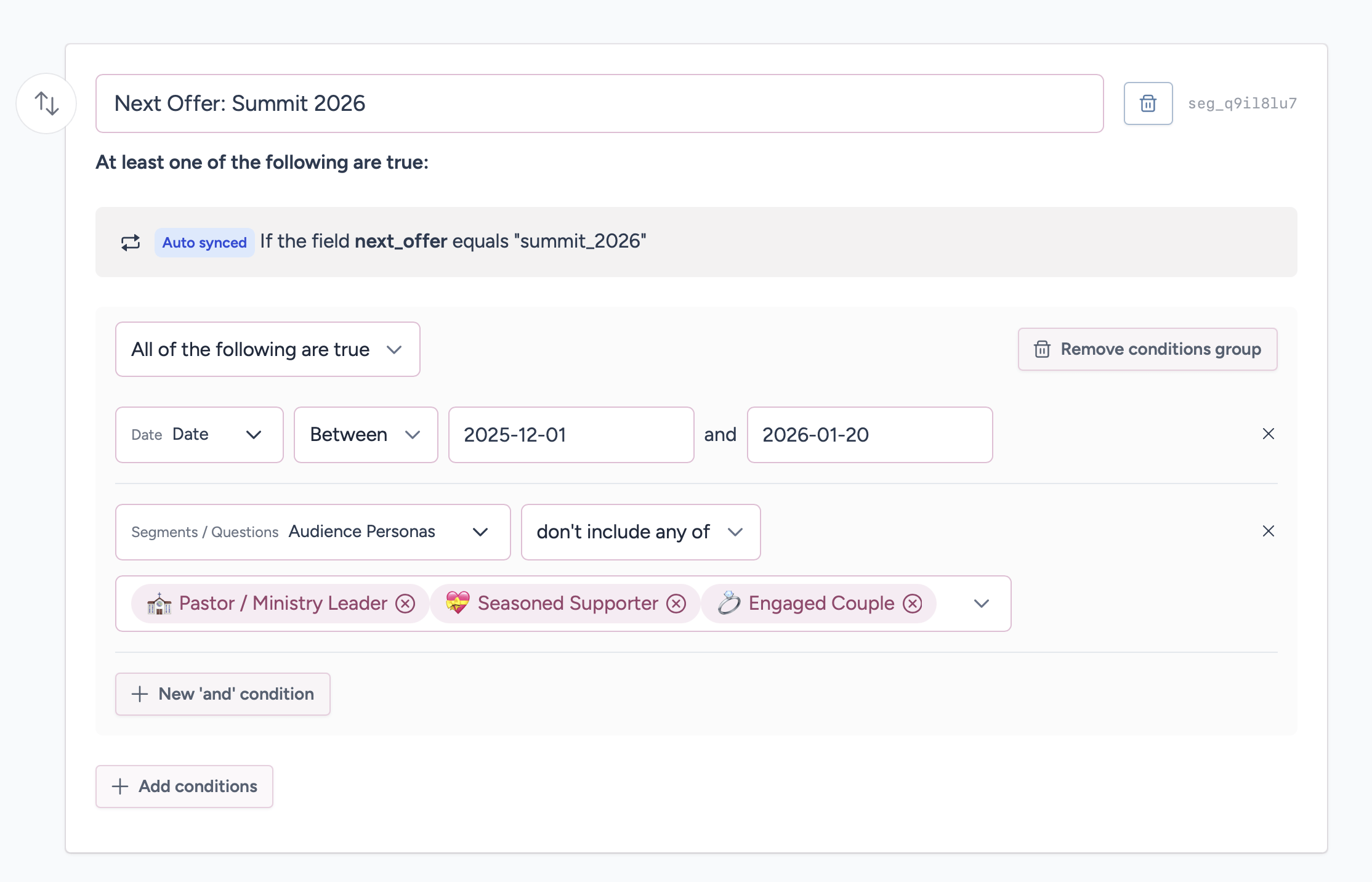
For example, I work with a lot of small to midsize nonprofits. They have certain seasons of the year where it’s really important. Like Giving Tuesday or quarter four. A lot happens in the nonprofit space trying to get monthly giving and donations.
They’ll want dynamic messaging that knows it is currently November and we’re gearing up for the end of the year campaigns and Giving Tuesday. Dynamic messaging appears that overrides everything else.
The system ensures testimonials match what’s being pitched. You don’t want a testimonial saying “this course was amazing” when you’re pitching your high-ticket agency services. Everything gets mapped together and matched up.
Smart Byline and Profile Requests
I always create a dynamic and smart byline author card at the bottom of the emails. Checking to see: are they a client? Have they already purchased? What messaging should we show here? A personalized recommendation?
Maybe if they haven’t given us any data in RightMessage, we’ll show that at the bottom: “Hey, we’d love to know a little bit more about you so I can tailor and personalize the content and emails you receive from me, both here in your inbox and on our website.”
I use liquid code and some custom code I’ve developed to build out your evergreen newsletter template. You can use it for evergreen newsletters, broadcasts, everything.
What liquid code is: It’s Kit’s templating language that lets you insert custom fields dynamically into emails. For example, {{ subscriber.first_name }} pulls in their first name, and {{ subscriber.next_offer }} pulls in whatever’s stored in their next_offer custom field. You can also use if/then logic to show different content based on custom field values.
Example of Dynamic CTAs
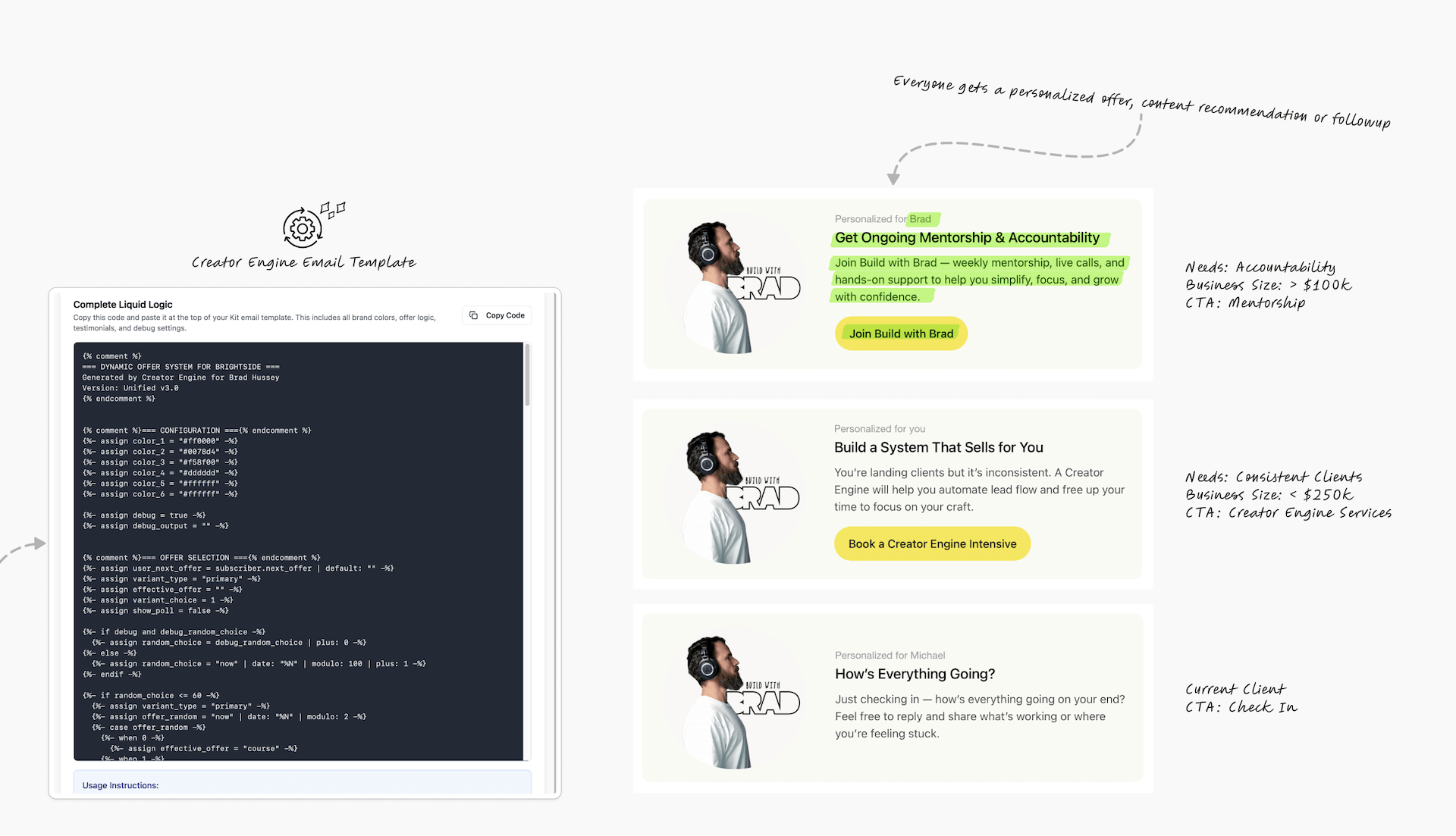 The call to action changes based on who’s reading:
For someone needing accountability (sub-$100K): “Join the mentorship and get some accountability.”
For someone doing $250K+: “Book a Creator Engines intensive or discovery call and let’s talk.”
For current clients: “How’s everything going? Hit reply if you’re stuck on something.”
The Repitch Loop
After 90 days in the evergreen newsletter, this automation pulls people out and pitches them again with a fresh angle or the next offer in their journey.
When they’re in the evergreen newsletter, we wait 90 days. Or a quarter.
We take them out of the evergreen newsletter, pause them, and pitch them again. Either on the offer they have not yet bought, or the next in the ascension product ladder, or a variation of the same offer.
Maybe they’ve joined the mentorship but we sent them the pitch to the mentorship. Next time we’re going to try a different angle. We’ll throw some case studies and testimonials or we’ll come at it from a different angle. We’ll check personalization data and personalize that email so it sounds even more resonant to their needs.
This increases effectiveness. It increases conversion rates. It increases opens.
I routinely get people saying “I love your emails, they sound like they’re written for me.”
Because they are.
I do a lot of thinking in how to write for each of the segments.
How I Structure Kit Email Marketing Automation: System, Sequence, and Entry Automations
Before I build anything in Kit, I map out the entire system.
My Kit account is a bit of a sandbox. There are automations for my own business and automations I’ve built for client work. When I come up with a new automation idea, I build it, test it, and refine it before it goes into any client’s account.
Everything falls into three types of automations:
System Automations
These run in the background and do things like:
- Update a profile
- Calculate an offer
- Understand who’s reading, what’s the audience segment
- Auto-list pruning
- Cycling you back into a pitch every 90 days
- Toggling back and forth between offers
- Calculating your lead score
- Decaying your lead score over time
Sequence Automations
These are actual content. There are emails in here:
- Evergreen newsletter
- Product pitch
- Post-purchase onboarding
- Progressive profiling (checking in occasionally to remind them to update their profile)
- Welcome sequence
Entry Automations
These are your entry lead magnet points. General newsletter subscribe, creator network joining, lead magnets.
From Architecture to Results: See The System in Action
You’ve just learned the technical foundation—the three types of automations and how they work together. Now watch what happens when I implement this for real businesses.
This 20-minute training shows three client case studies and the results they achieved:
Client Results You’ll See:
- Chloe (The Jungle Doctor): $35,000 in first 30 days + $20,000 in annual recurring revenue. 250K Instagram followers, zero backend system before we built it.
- JP (Future of HR): Tripled list growth in months, 51% open rates, 14% click-through rates, easy 10x ROI on a fully scalable system.
- Scott (Gridiron Warrior): $10,000 in sales within the first week. System runs fully automated while he trains coaches and athletes.
What You’ll Learn:
- Why DIY “duct tape” systems break as you grow (and how to recognize the warning signs)
- How the perpetual pitch loop prevents subscriber fatigue while maximizing conversions
- The difference between templates/courses and white-glove engineered architecture
- How conflict prevention safeguards protect your revenue and reputation
Two Paths From Here:
- Ready to implement this in your business? Book a discovery call to discuss your Creator Engine
- Want to see every automation in detail? Keep reading below for the complete technical breakdown.
The New Subscriber Automation Flow
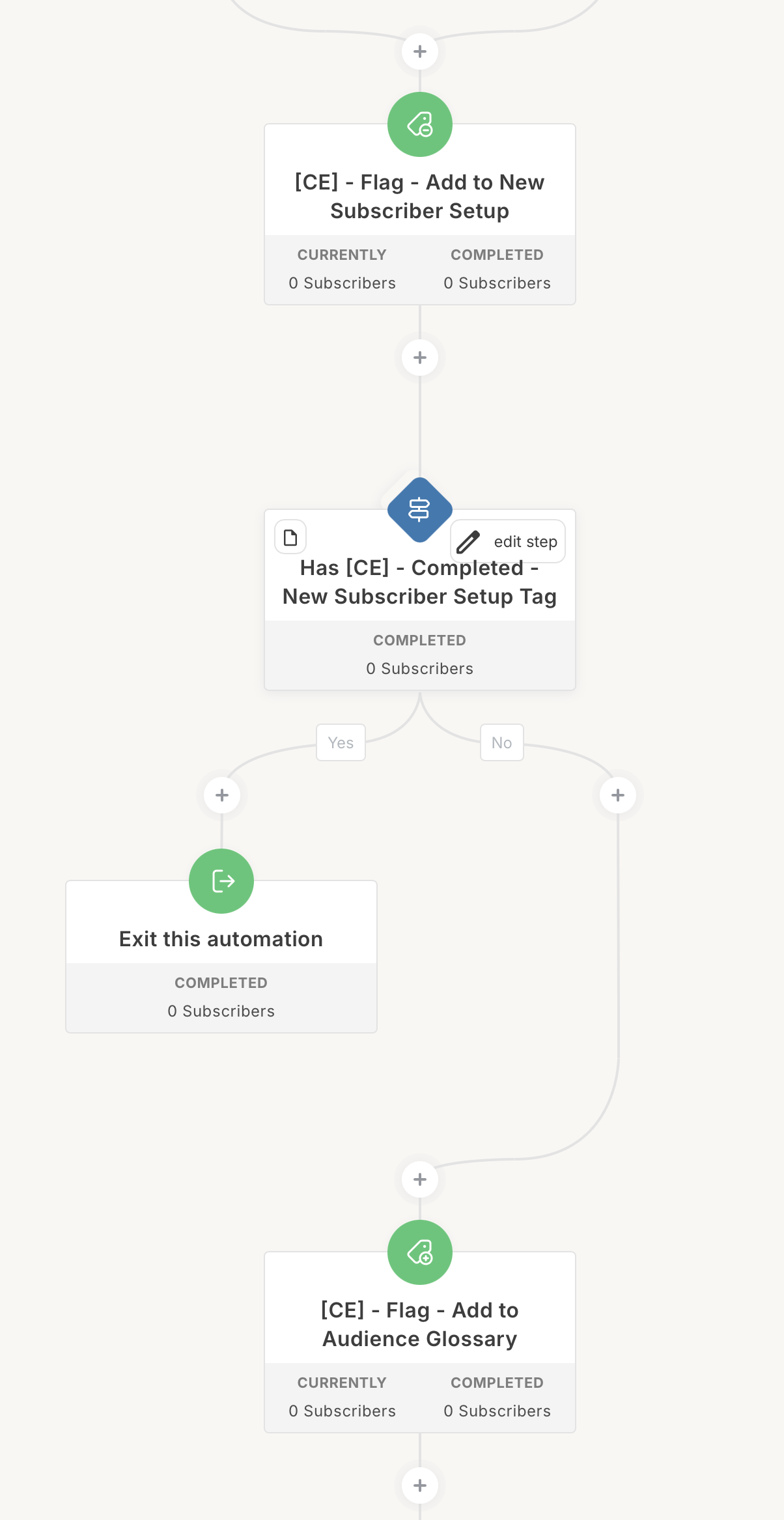
This is the master automation that fires when someone joins and adds them to all the other automations—audience glossary, list pruning, pitch cycle, and progressive profiling.
Every time somebody joins, the new subscriber automation fires.
They’re either added by a flag tag (which is what we use to move people around between automations) or any form.
What a flag tag is: It’s just a Kit tag that triggers an automation. For example, when we want to move someone from one automation to another, we add a tag like “pitch_product_a” and that tag is set up to trigger the Product A pitch automation. It’s like a routing system.
Don’t add them via a regular tag. Add them to a form so you have some sort of audit trail to know where they entered from.
They join. If they’ve completed this before, we don’t add them through this again.
We add them to the Audience Glossary. This is where we add them to various other visual automations.
What a visual automation is: In Kit, you can create automations in two ways—sequence automations (which are just a list of emails) and visual automations (which are flowcharts with if/then logic, wait steps, and actions). Visual automations let you build complex logic flows.
We check: how do we identify them? Are they a freelancer, agency owner, HR consultant? Based on whatever audience segments we’ve mapped out.
This updates their custom fields so we can address them accordingly. “Hey Brad, as a freelancer you struggle with this.” And that’s dynamic.
Add to auto-list pruning. I use single opt-in, but this automation keeps the list healthy. They’re added to probation. We check how engaged they are. If they’re not engaged, we remove them. If they are engaged, we keep them in the auto-list pruning loop.
Add to pitch cycle. Pitch cycle is every 90 days, or whenever the lead score hits 10. Then they’re pitched.
Keep in mind there’s a lead score decay. Once they get to 10, over time that decays back down to zero. It ebbs and flows based on their engagement and intent.
Add to progressive profiling. Just checks to see over time who they are.
We set the lead score to zero. We set the pitch count to zero. And we say they’ve completed the new subscriber setup.
The Audience Glossary Automation
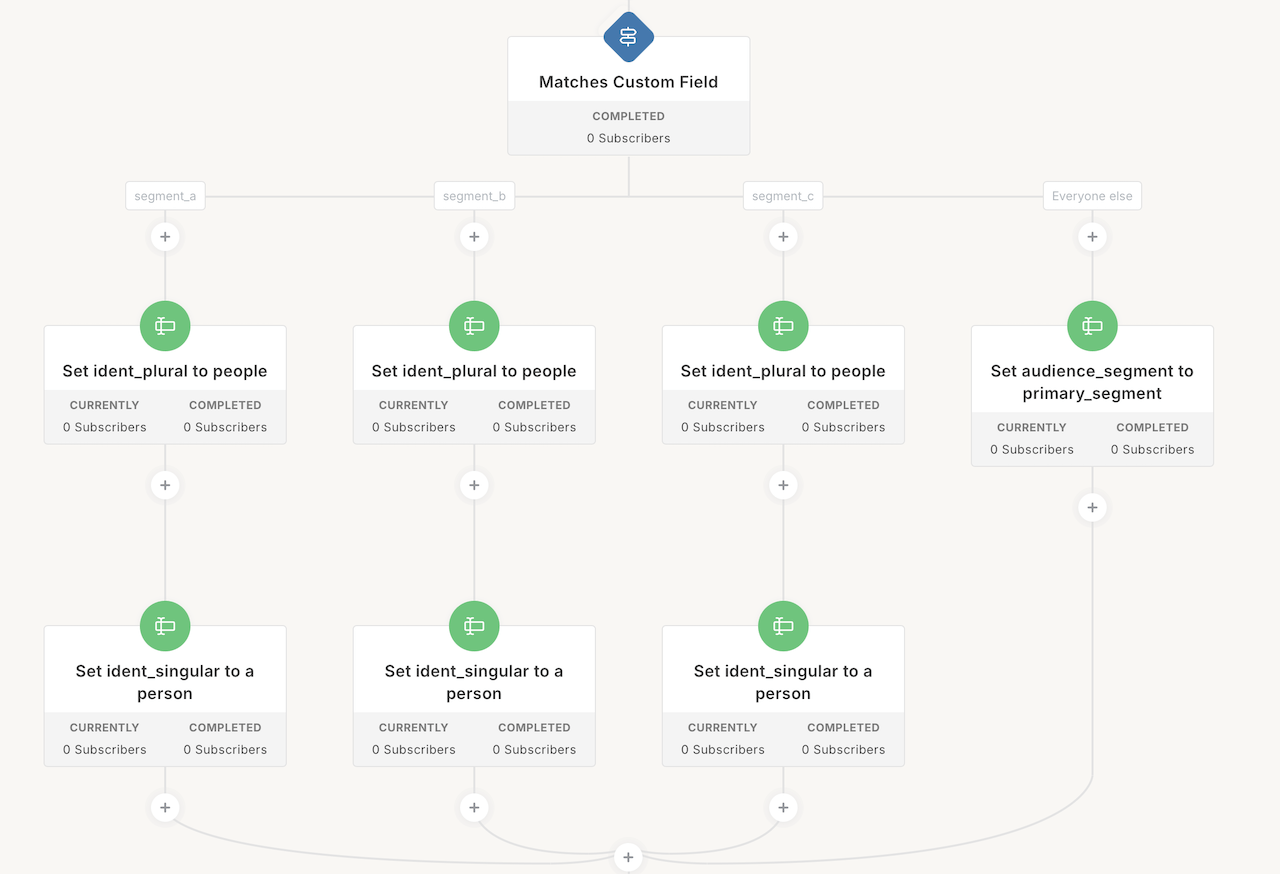
This Kit visual automation tracks and updates who people are based on their behavior and what they tell us.
Here’s what’s actually happening:
When someone gets added to this automation, Kit checks a custom field called audience_segment that’s stored in their profile.
Maybe their audience_segment is “freelancer.” Or “agency owner.” Or “HR consultant.” Or “veterinarian.” Whatever audience segment we’ve identified for them.
Changes to this segment happen either in native Kit (through a poll that updates the audience_segment custom field) or in RightMessage when they update their profile or browse your site reading content.
RightMessage will say “oh this person is reading a lot of leadership content, so they’re interested in leadership, therefore their audience segment should be HR consultant.”
When the audience segment changes, this automation runs again and checks: did they match segment A, B, or C?
Creating Readable Identities for Email Personalization
Here’s the problem: when we store audience segment data in custom fields, we often use underscores. Like freelance_web_designer or HR_consultant.
That’s not readable in an email.
So we need to create a readable version that we can use in liquid snippets in emails—just like we would use first name or last name.
The ident_plural and ident_singular Tactic
Let’s say they are a freelancer, segment A. We want to set their ident_plural and ident_singular custom fields.
I learned this tactic from Brennan Dunn at RightMessage.
It’s basically identity plural and identity singular—readable versions of who they are.
Freelance plural would be “freelancers” and singular would be “freelancer.”
The trick is to include the article in the singular. “A freelancer” or “an agency owner.”
Here’s why:
You’re going to use this in a dynamic personalized liquid snippet in your emails: “Hey, as a freelancer you struggle with…”
The word “freelancer” is pulling from that custom field dynamically.
But if you don’t include the article and you just store “freelancer,” what if the next person’s singular is “agency owner”? Then it’ll sound awkward: “as a agency owner.” You want it to say “as an agency owner.”
So the article (a or an) gets included in the singular custom field. For plural you don’t need it. Everyone knows “freelancers struggle with” or “agency owners struggle with.”
How This Gets Used
This automation updates custom fields in their Kit profile:
ident_singular: “a freelancer”ident_plural: “freelancers”- Plus other segment-specific data
Then we can use those custom fields throughout our emails in liquid logic for dynamic call to actions, testimonials, content personalization, and other visual automations.
It’s fantastic.
Calculate Next Offer
This Kit automation figures out what product or service each person should see next based on where they are in their business and what they’ve already bought.
What it actually does: It updates a custom field called next_offer in their Kit profile with the appropriate product or service they should be pitched.
How I determine next offers depends on the client, but as a general rule it’s based on:
- When their
audience_segmentcustom field changes - Their
purchase_countcustom field changes - Their
membership_statuscustom field changes - Or a flag tag, adding them directly to trigger the calculation
Example: Their audience segment might change from “freelancer” to “agency owner.” We don’t want to pitch them the freelancing course anymore. We want to pitch them mentorship. So the automation updates their next_offer custom field to “mentorship.”
Purchase count is a custom field that tracks how many things they’ve bought. You have a master automation that runs when they buy something and increments their purchase_count by one.
Membership status is another custom field that goes from “trial” to “active monthly” or “annual.”
When any of these trigger this automation, we set the pitch_count custom field back to zero. We have a pitch count that runs to make sure we don’t pitch them too many times on the same offer.
The automation checks purchases first. If they’ve purchased a specific offer, then their next_offer gets set to the next one up the product ladder. If they’ve purchased another offer, then their next_offer is that.
Then we check based on audience segment.
Each segment will get different next offers. And that always changes. If someone goes from “engaged” to “married” segment and they let us know, boom, everything recalculates.
Auto-List Pruning in Detail
This automation keeps your email list healthy by constantly checking who’s engaged and who’s not, then re-engaging or removing inactive subscribers.
When you get added, we check in 30 days. Have they opened an email?
If yes, cool. We’re going to wait another 150 days and then we’re going to add them back to the top of this visual automation via a holding automation.
Here’s how that works. You get added to this visual automation. When you get to the bottom, we can’t reliably add you to the top of this automation again while you’re currently inside of it.
So what we do is we push them to a different automation that receives them. That automation says “cool, thanks for sending that person to me. I’m going to wait five minutes and I’m going to add them back to you.” It’s just a loop.
Wait 30 days. If they have not opened an email, we send them a cold subscriber engagement email. “Hey, you still interested? If not we’re going to remove you. You can always unsubscribe.”
It keeps checking a few times after that. If they fail to open any emails and they’re not engaged, we will tag them with a big scary red X so that we can unsubscribe them.
I don’t suggest unsubscribing automatically because you never know what’ll happen. You don’t want to accidentally unsubscribe everyone if something goes wrong. I want to have a safety mechanism in place.
This runs literally forever. You cannot escape this automation. Everyone’s in it. So you always know who’s inactive and who is active.
The Pitch Cycle Automation
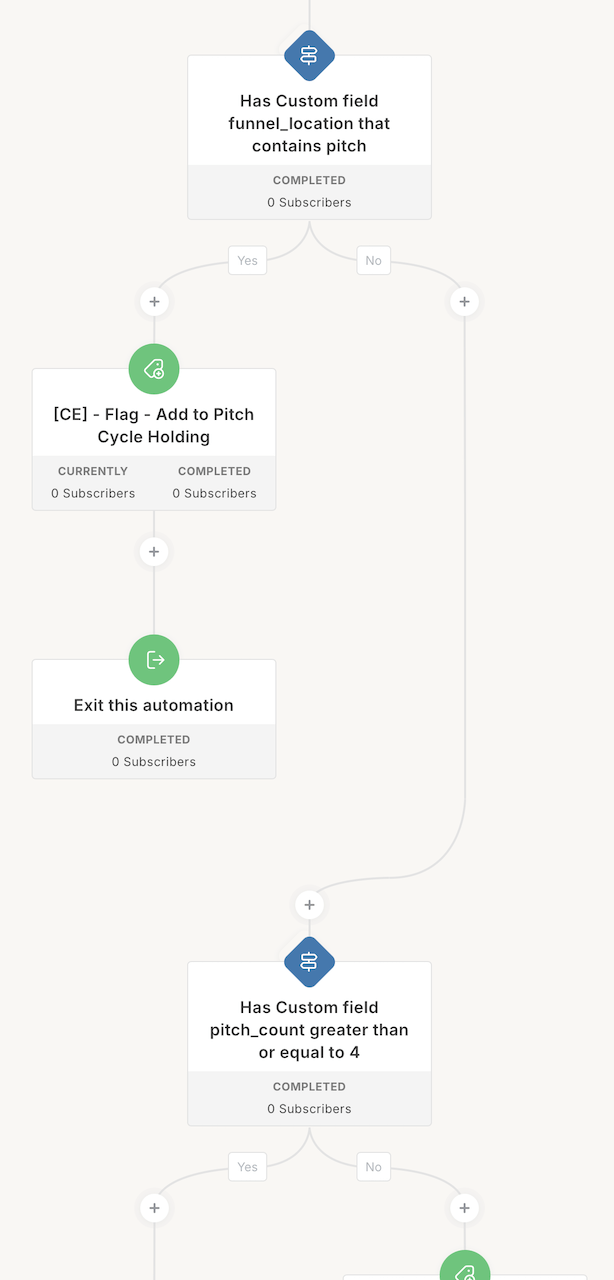
This automation controls when and how often people get pitched an offer, typically every 90 days, so we’re not overwhelming them or pitching too frequently.
Everyone’s added to the pitch cycle via the new subscriber visual automation.
Basically every 90 days we add them to the pitch cycle.
Customizing Pitch Frequency
There are a couple ways I do this. Some clients say “I want to pitch every 30 days” or “I want to pitch once a year.” The timing changes based on their preference.
I always update a custom field called funnel_location to track where people are in the system. I use universal language like “pitch,” “evergreen,” “welcome,” something like that.
What this means: Every subscriber has a funnel_location custom field in their Kit profile that says where they currently are. It might say “pitch” or “evergreen” or “welcome_sequence.”
Then in the subscriber page in Kit I create segments (which are just saved filters) that say:
- Current location: pitch (where
funnel_location= “pitch”) - Current location: welcome sequence
- Current location: evergreen newsletter
- Current location: subscriber probation
- Onboarding
- Offboarding
This way we know where people are and we can exclude people in certain locations when we send a broadcast or pitch email. Like if they’re already in a pitch, we don’t want to send them another pitch manually.
Pitch Count and Limits
First, the system checks if the funnel location contains the word “pitch.” If it does, we add them back to the pitch cycle holding and go back to the top so we don’t pitch them. Nobody wants to be pitched while they’re already in a pitch.
Then we check if their pitch count is greater than or equal to 4. This basically means if we’ve pitched them four times on this same product, we don’t want to do it again too many times.
Four times every 90 days is basically a year. If you’ve pitched them four times over the year on this specific product, the system stops. It’ll exit them and add them back to the pitch cycle holding.
Pitch count resets when we recalculate their next offer.
If their offer was “freelancer course” and they were pitched that four times and didn’t buy, they’re not going to get this automatic 90-day pitch anymore.
But let’s say in the evergreen newsletter in the dynamic call to action they do buy the freelancer course. Now we’ve updated their purchases and their audience segment. We reset the pitch count and recalculate to the next offer.
We want to be able to pitch them the next offer. We don’t want to remove them from the every-90-day pitch forever. Only when they’re just not buying the thing.
Everything’s good, they pass, then we pitch the next offer. This flag tag sends them to the appropriate pitch automation.
I keep everything modular because it’s much cleaner to see, update, and manage than one big messy visual automation.
Pitch Next Offer Decision
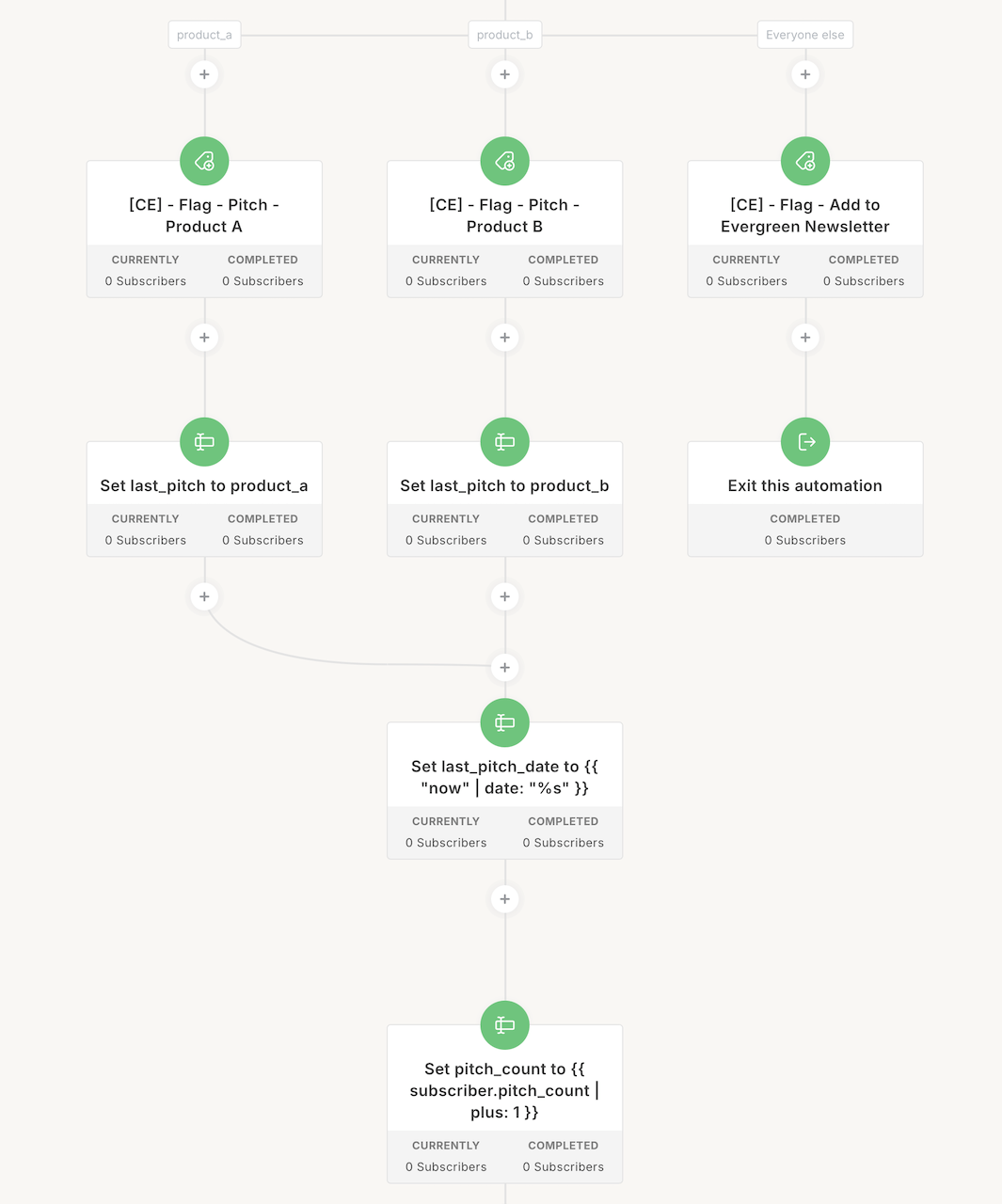
This automation routes people to the right pitch based on their calculated next offer and their lead score, so they get the most relevant product at the right time.
I do this in a couple different ways.
We either add them via flag tag or when the lead score changes to 10 (or 5 or 30, whatever it is).
We have a lead score decay which eats away at this lead score. If they get to 10, like they click your call-to-action link 10 times in a month, their lead score will stay at 10. But over time that should decay unless they keep clicking your call to action to keep that lead score afloat.
We reset the lead score to zero once they are being pitched because we don’t need the lead score to be 10 anymore. We are currently taking action on their intent.
Then we check to see: have they recently been pitched? If they have, exit.
Then we check to see what their custom field is for next offer. If the next offer is product A, B, or C, or freelancer course, courses, services, whatever your offer is, then we add a flag tag “pitch” to whatever that visual automation is and we send them that way.
Otherwise we add them to our everyday newsletter.
After they’ve been pushed to that pitch automation, whatever their pitch is, we set a custom field called last_pitch to a Unix timestamp using seconds.
What this means: Kit stores the exact date and time they were last pitched as a big number (seconds since January 1, 1970). It’s precise.
Why do we use that? Because we can calculate if right now is greater than the timestamp that was added when they were pitched. We just need to know precisely when they were pitched.
If we want to send a segment broadcast, we can check: “if it’s been greater than this many days since this timestamp, then we’re safe to send them a pitch.”
It’s pretty advanced. We don’t always use it, but it’s there just in case. It’s nice to have precise data on when they were pushed around to different things like a pitch.
We also increment a custom field called pitch_count by one to track how many times they’ve been pitched (one, two, three, four times). Then we add the tag “pitched recently” for the next pitch cycle check.
These custom fields—last_pitch, pitch_count, lead_score, ident_singular, audience_segment, and others—all get used throughout the automations and in liquid logic for dynamic personalization.
Pitch Offer Toggle
For clients with just two main offers, this simple automation alternates between them so people see both options over time without needing a complex product ladder.
This is something I do if a client has just one or two offers and we don’t need to ascend a product ladder. We just toggle back and forth.
Let’s say you have speaking and consulting.
I work with a lot of HR coordinators and leaders and consultants, business coaches that just do speaking and consulting for C-suite leaders, teams, governments, agencies and whatnot.
They will toggle speaking and consulting. We’ll personalize it to who’s reading.
When they come down: was their last pitch product A? If it was not (meaning they’ve never been pitched before) or was product B, then they get pitched product A or consulting.
We set their last pitch custom field to product A, pitch date, pitch count, pitched recently.
Next time they come through on their 90-day pitch or force pitch or lead score trigger, we say: now their last pitch matches product A, which means let’s now pitch them variation B, which might be speaking.
Last pitch is product B. Now they go through next time, it’ll be product A, product B, product A, product B. Total of four times, they stop.
Calculating Lead Score and Lead Score Decay
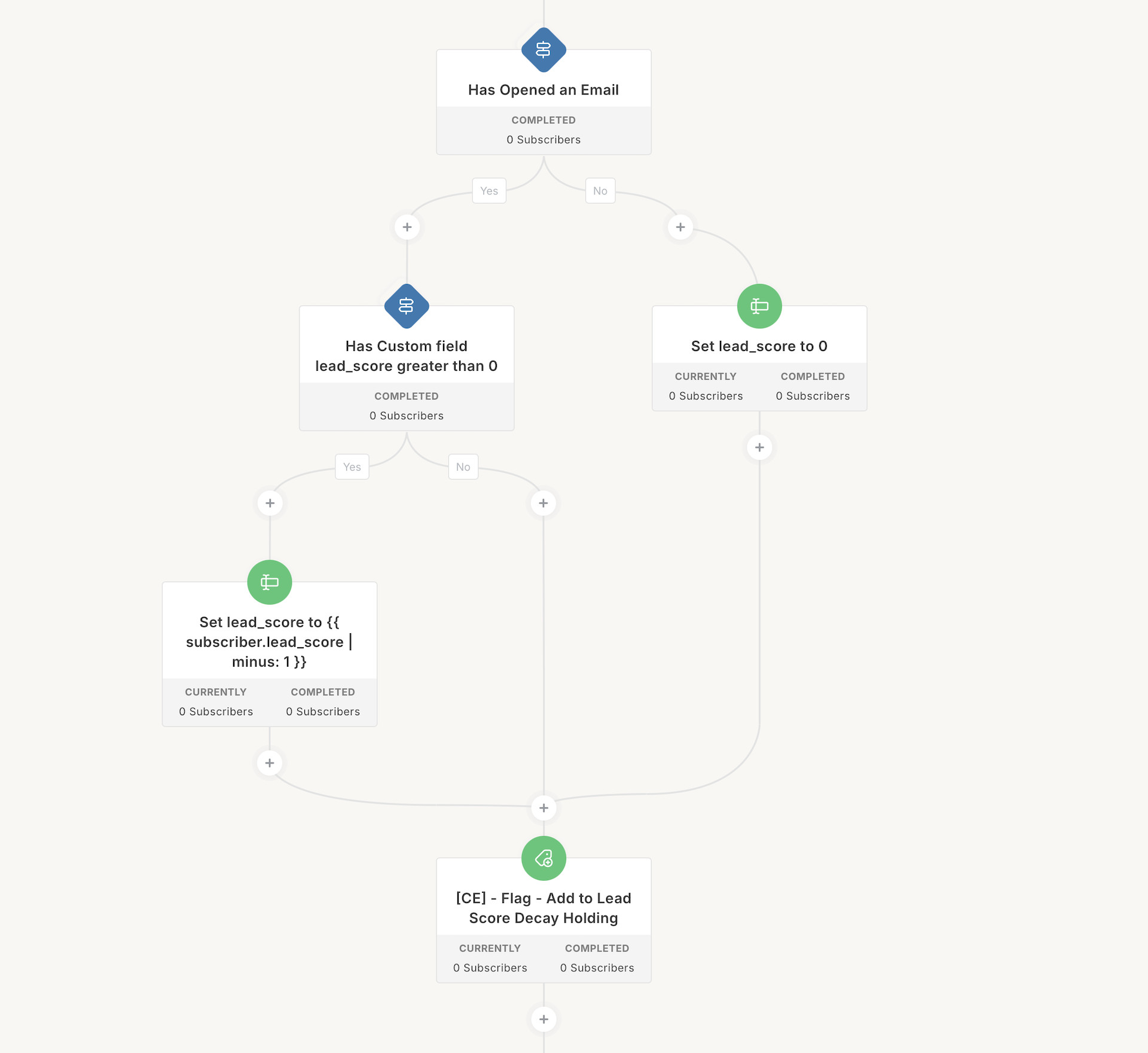
This tracks how engaged someone is by giving them points when they click links, then slowly decaying those points over time so we’re measuring current intent, not old behavior.
What lead score actually is: It’s a custom field in their Kit profile that stores a number representing their engagement level.
If they click a link in an email, a link trigger increments their lead score custom field by one. Click 10 links, your lead score is 10.
How Lead Score Decay Works
Then we do lead score decay.
Lead score decay works like this: if they’ve opened an email in the last 60 days and their lead score is greater than zero, we minus their lead score custom field by one.
Then the automation adds them to the lead score holding automation, which loops them back through. It does it again.
The lead score holding doesn’t come right away. It waits 30 days so we’re not eating their lead score back to zero within minutes. It happens monthly.
If they’ve not opened an email, we set their lead score to zero.
What if they were engaged in January with nine lead score points, then never opened your emails for three months? We reset their lead score to zero. They’re not engaged anymore.
Why This Matters
That lead score custom field gets used throughout the system. We use it strategically to trigger pitches when people are showing real intent—when their lead score hits 10, for example.
It also gets used in liquid logic for dynamic call to actions and in other visual automations to determine what people should see.
The Welcome Sequence
This personalized sequence welcomes new subscribers with 3-4 emails tailored to their segment, then routes them to their first pitch.
A welcome sequence is dynamic depending on who’s reading it.
Everyone gets a general welcome email while we’re waiting for personalization data to come in from their survey.
The next three emails personalize based on their segment.
After the welcome sequence, the system adds them to “pitch next offer.” That visual automation then pushes them into whatever their pitch is. Product A, B, or C.
We remove them from their evergreen newsletter. We set the funnel location to “pitch product A” so we can check to see if they are in a pitch.
That pitch is just however many emails. Write good copy, personalize it using liquid. Set the last pitch to whatever the product was. Then add to evergreen newsletter.
The Dynamic Evergreen Newsletter
This is the ongoing weekly newsletter that sends automatically with personalized CTAs, testimonials, and offers based on who’s reading.
The system adds them and sets the funnel location to evergreen newsletter. They receive the evergreen newsletter sequence.
They get the dynamic content.
My evergreen newsletter has an intro email personalized in the footer. Depending on who’s reading they’ll see various different things.
Then the evergreen newsletters with a smart card and smart ending, the smart byline author card.
This call to action is dynamic based on who’s reading. We have a safe fallback, but depending on who’s reading that will change based on the liquid logic that I custom write for myself and my clients.
I actually built software that helps me write it to speed things up. But you can use snippets.
The logic behind it is a lot of liquid and it’s generally customized to the client based on a number of things.
It runs and pre-fills based on your RightMessage, the copywriting we put together for you or you write, and all these different variables that display in the email.
It’s a closed loop system that runs continuously.
How People Enter the System
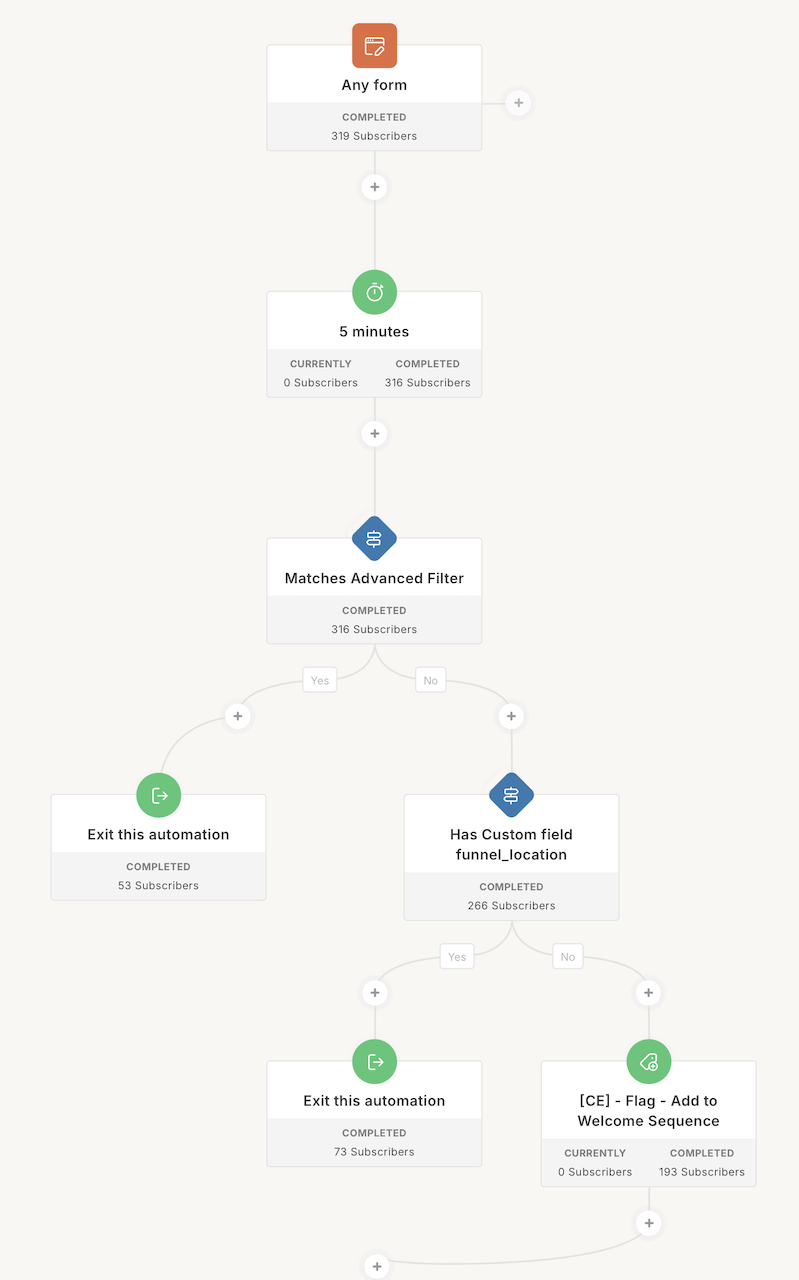
The system fires when people join through any of your entry points: lead magnets, newsletter signups, webinar registrations, or opt-in forms.
Based on which form they fill out, they’re automatically added to the appropriate automation flow.
That’s what I do for myself and for all my clients.
This approach is advanced. I don’t expect everyone to set it up this way. But this is what my clients get when they work with me.
That’s how I use Kit.
What You Just Saw
This is what 14 years of building email marketing systems looks like.
Not generic welcome sequences and weekly broadcasts. Dynamic, adaptive, personalized marketing that treats people like people.
The difference between amateur email marketing and professional revenue-generating systems comes down to strategy, planning, and intelligence. Every automation working together. Every touchpoint personalized. Every subscriber getting exactly what they need, when they need it.
And all of it running automatically in the background.
Remember those case studies in the training video? The $35K in 30 days, the 51% open rates, the $10K in the first week—that’s what happens when you move from DIY complexity to engineered architecture.
Is This For You?
Here’s my key qualifier: If you’re not in your own way yet, then you’re not ready to work with me.
This level of sophistication is for established businesses doing $250K+ annually who are still DIYing their email marketing when they shouldn’t be—and it’s costing them time, money, and opportunities.
Who This Works Best For:
Authority brands and executive coaches using content to drive sales calls and consulting engagements.
Businesses with large product catalogs—books, courses, training programs, memberships—who need intelligent segmentation to pitch the right offer to the right person.
Mid to large nonprofits wanting to increase monthly giving and major gifts through smart automation, especially during Giving Tuesday and Q4 campaigns.
If your marketing needs to match the quality of your work, that’s where my Authority Engine comes in.
How We Work Together
Services start at $15,000 and range up to $30,000+ depending on complexity and your email marketing automation needs.
I build the entire system, implement it, launch it, and refine it over time. You focus on serving your customers and running your business. The marketing runs itself.
See client testimonials and learn more about the Authority Engine here.
Ready to talk? Book a call.
BRAD