
A PhD-level executive consultant with elite credentials had multiple high-ticket offers, a diverse audience of CHROs and HR leaders with completely different needs, and published thought leadership sitting unused — but no email system in place.
Instead of building a generic newsletter and fixing it later, Dr. Derek Lusk hired my agency to design and build an automated email newsletter system in Kit from day one that segments every subscriber on opt-in, personalizes all messaging based on their role and stated problem, routes them to the right offer at the right time, and runs perpetually without manual intervention.
In 2 weeks, we delivered a self-sustaining authority platform that treats a Fortune 500 CHRO shopping for succession planning tools completely differently than an HR professional looking to upskill… automatically. Here’s exactly how we built it.
The Client: Dr. Derek Lusk, Persona 28. Executive hiring expert, Hogan Assessment specialist, published author in HBR and Psychology Today, serving Fortune 500 CHROs and C-suite executives.
The Problem: A world-class consultant with elite credentials, multiple high-ticket offers, and published thought leadership… but no email system to distribute it effectively to a diverse audience.
The Build: A 2-week automated email newsletter system that transforms an undifferentiated list into a precision segmentation engine that routes every subscriber to exactly the right offer, at exactly the right time, using exactly the right messaging… automatically.
The Situation: Expertise Without Infrastructure
When Derek came to us, he had what most high-level consultants have:
- Serious credentials (PhD in business psychology, published in HBR, Psychology Today, and other major outlets)
- Multiple high-ticket offers (Hogan Assessments, executive coaching, talent evaluation, training programs)
- Diverse audiences (CHROs, Heads of Talent, senior HR leaders, each with different needs and buying contexts)
- No email infrastructure (just a basic Kit opt-in form and a single follow-up email)
Derek recognized what most consultants miss: his audiences were fundamentally different. A CHRO evaluating succession planning tools has different needs, timelines, and buying authority than an HR Business Partner looking to upskill in assessment science. But he had no system to communicate differently to each.
The challenge: Build an automated email newsletter from scratch that could:
- Segment subscribers immediately
- Personalize messaging by role and need
- Route people to relevant offers automatically
- Position authority without manual intervention
- Run perpetually as his list grows
Most consultants solve this by sending generic emails to everyone and hoping something sticks. Derek wanted to do it right from the beginning.
The Strategic Audit: What We Discovered
In our 90-minute Personalization Sprint, we built the blueprint. Derek knew what he needed: an email system that could handle audience diversity without requiring him to manually manage segments or write different versions of every email. Our job was to map the architecture.
Here’s what we defined:
The Audience Segments (2-Axis Model)
We intentionally constrained segmentation to avoid overengineering:
Axis 1: Role (Buying Context)
- CHRO / Chief People Officer
- Head of Talent or Talent Management
- Senior HR Business Partner
- Other HR or leadership role
Axis 2: Primary Problem (Immediate Intent)
- Succession planning or leadership pipeline
- Executive or senior leader coaching
- Assessment selection, interpretation, or implementation
- General leadership or talent development education
This gave us clean, actionable segments without persona sprawl.
And this matters more than you’d think. Most people setting up Kit go on a tagging frenzy, tagging subscribers with “clicked this link,” “downloaded this,” “interested in that,” “opened this email twice.” They collect data for the sake of collecting data. This results in a tangle of tags that aren’t mapped to any actual system. They’ll just sit there, cluttering your account, making it harder to see what actually matters.
We keep it simple: if a tag or custom field doesn’t have a purpose, create a clear audit trail, change what email someone receives or what offer they see, we don’t create it.
The Offer Map
Derek had three primary service offerings and one educational product:
High-Touch Services (consultative, longer sales cycle):
- Executive coaching
- Succession planning engagements
- Assessment implementation
Productized Offers (shorter decision window):
- Assessment to Impact (course for HR professionals)
The Bridge:
- Hogan Assessments (often the entry point to deeper services)
The Core Problem
Without a system in place, Derek faced a classic consultant’s dilemma: how do you email a list when your audience wants completely different things?
The risk of building a generic newsletter: A CHRO interested in succession planning would see the same CTAs as someone looking to take a course. The coaching pitch would go to people who clearly wanted assessments. Everyone would get everything, and nothing would feel relevant.
What we needed to build:
- Routing logic that matches people to offers
- Personalization that doesn’t feel like mail merge
- A system that adapts messaging based on stated need
Derek could have built a one-size-fits-all newsletter and called it done. Instead, he wanted infrastructure that could scale with his list without losing relevance.
The Build: Personalized Newsletter Architecture in Kit
We built Derek’s automated email newsletter system in three layers:
Layer 1: Segmentation Infrastructure (RightMessage Surveys)
We designed a post-opt-in survey that captures:
- Role (who they are and how they buy)
- Primary Focus (why they’re here right now)
- Conditional follow-ups (only when relevant):
- If Executive Coaching: What level of leaders?
- If Assessments: Choosing or implementing?
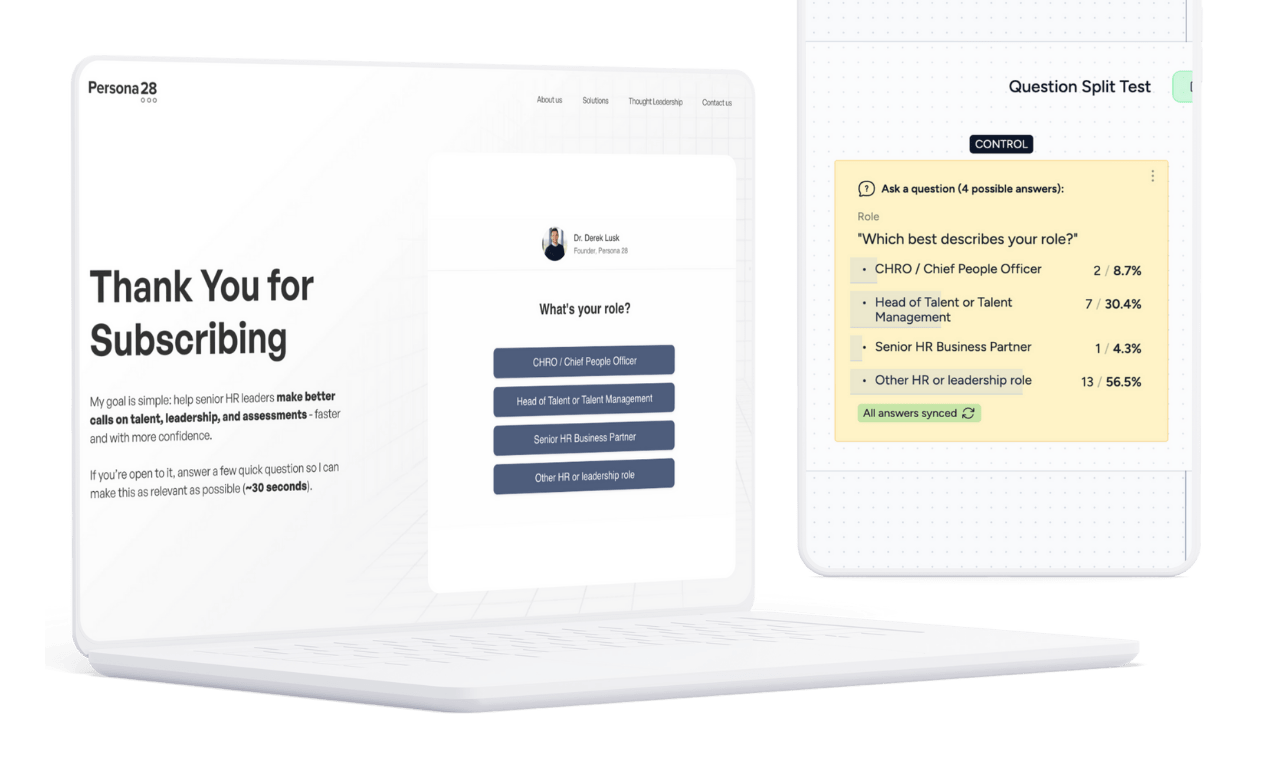
Critical decision: We keep surveys short (3-5 questions max) and ask only what the system can’t infer later. Anything learnable via behaviour gets deferred.
The result: 80%+ completion rates because the questions are easy, relevant, and fast.
Layer 2: Dynamic Email System (Kit)
We built four core email sequences that create a personalized newsletter experience in Kit:
Welcome Sequence (3 emails over 1 week)
- Email 1: Orientation — What Persona 28 is about, who it’s for, why leadership decisions fail
- Email 2: Problem Framing — The real issue behind succession, coaching, or assessments
- Email 3: Path Clarity — Help them understand their next logical step
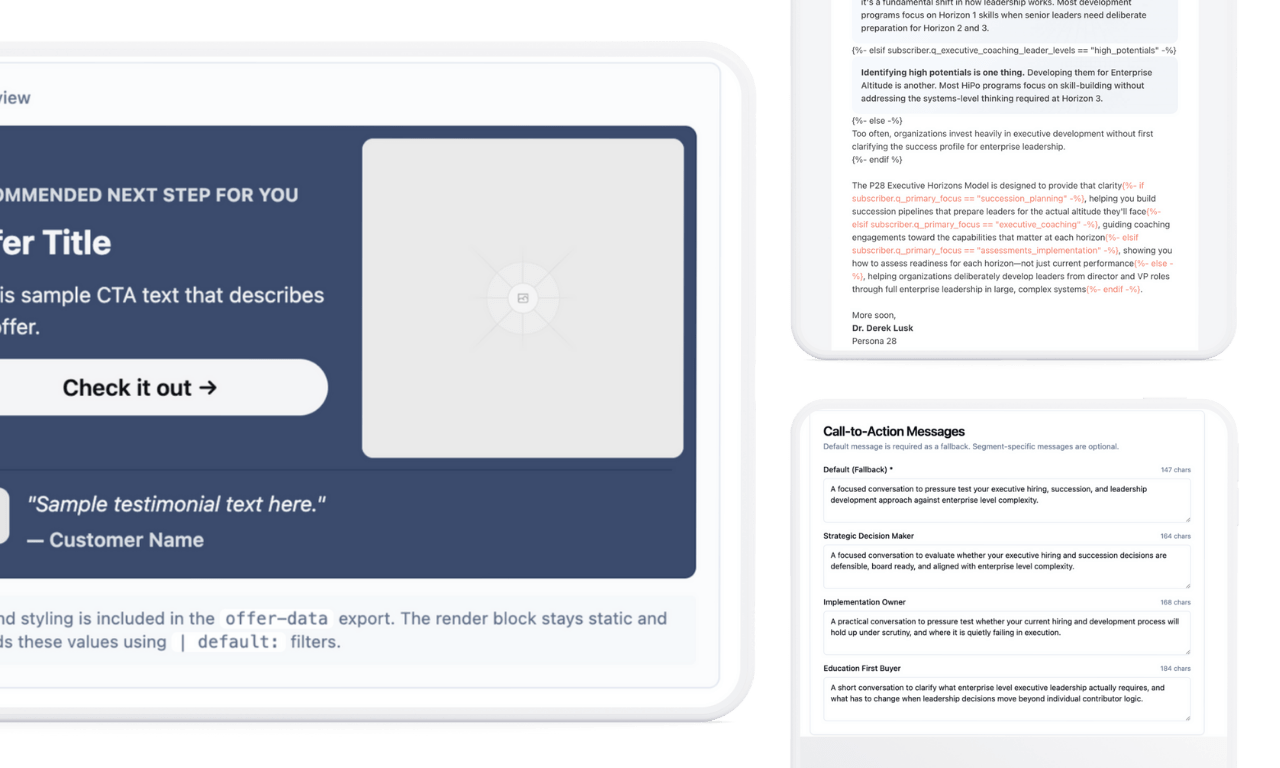
Each email includes strategic personalization:
- Problem framing (1-2 sentences that connect Derek’s argument to their specific context)
- Dynamic CTAs (routes to the most relevant offer based on segment + focus)
- Engagement prompts (P.S. questions that drive replies and gather voice-of-customer data)
Pitch Sequences (3 emails each, sent over 1 week)
We built dedicated 3-email pitch sequences for each offer:
Assessments Series:
- Why Most Leadership Assessments Should Never Be Used
- What Makes an Assessment Scientific?
- The Assessment Framework We Use (and Why)
Coaching Series:
- Is Your Executive Coaching Proving Its Value?
- How to Measure Executive Coaching ROI (Scientifically)
- Why Most Organizations Don’t Know If Executive Coaching Works
Training Series:
- From Assessment Expertise to Executive Advisory
- From Certification to Influence
- From Assessment to Impact
Each sequence is personalized by role, focus, and segment identity. But here’s the key: personalization is strategic, not cosmetic.
We don’t just insert first names and call it done. We adjust:
- How the problem is framed
- Which proof points are shown
- What CTA is presented
- The positioning of the offer itself
Evergreen Newsletter Engine (20 weeks of content)
Derek provided 20 newly written thought leadership pieces. We turned them into an automated email newsletter that runs on a perpetual schedule:
- Sent once per week on Tuesdays
- Dynamic CTAs that adapt per subscriber
- Personalized problem framing
- Reply-driving engagement questions
- Authority positioning that builds trust over time
Format: “Executive Brief” structure
- The Provocation (contrarian claim)
- The Evidence (research/data)
- The Framework (model or methodology)
- The Implication (what this means for decisions)
- Dynamic CTA based on segment
The Complete Subscriber Journey
Here’s what happens from the moment someone joins Derek’s list:
Week 1: 3 personalized welcome emails (customized based on their role and focus)
Week 2: 3 personalized pitch emails (for their most relevant offer)
Weeks 3-14: 12 weeks of evergreen newsletter content
Day 91: System pauses newsletter, sends them through a second personalized pitch sequence
After pitch: Back to evergreen newsletter from where they left off
Day 181: Third pitch cycle
After 4 total pitches: Subscribers remain on newsletter only (no more dedicated pitches)
This gives Derek months of runway before needing to add more content. And when it’s time? We’ve trained him on exactly how to add new pieces to the rotation. Plus, clients who partner with us on retainer get proactive content additions, timely reminders, system refreshes, and ongoing optimization based on subscriber data.
Layer 3: The Creator Engine (Dynamic Offer System)
This is where it gets interesting.
The Creator Engine is our proprietary system that automatically routes every subscriber to the right offer at the right time—based on who they are, what they need, and what they’ve already purchased.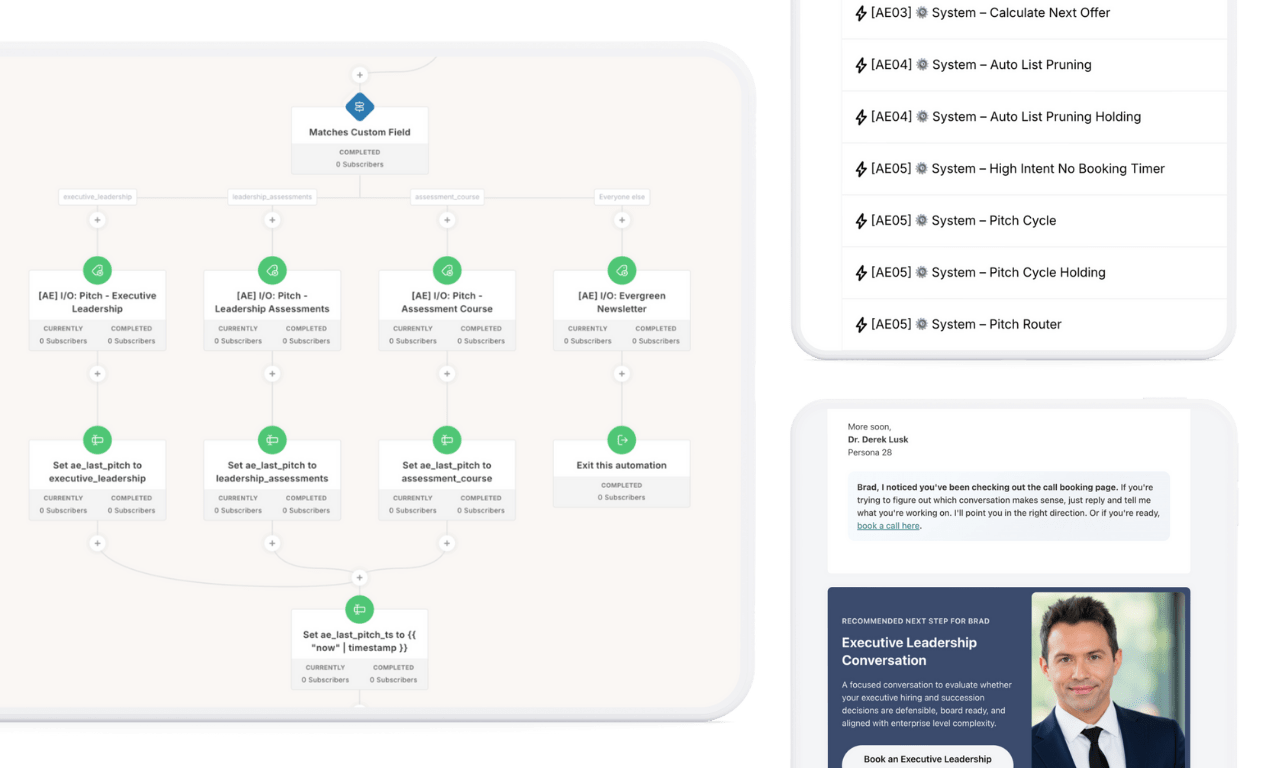 It consists of three interconnected pieces:
1. Visual Automations (The Intelligence Layer)
Behind the scenes in Kit, a network of automations runs continuously:
- Subscriber configuration – Initializes every new subscriber and assigns their starting offer
- Calculate next offer – Determines best match based on survey data and behavior
- Pitch cycle timer – Manages the 90-day re-pitch loop (pitch => newsletter => pitch)
- Lead score calculator – Tracks engagement and intent signals
- High-intent visitor detection – Flags people visiting the contact page repeatedly
- Auto list pruning – Maintains list health with smart re-engagement checks
- Pitched recently timer – Prevents over-pitching (built-in cool-off periods)
These automations update custom fields, add/remove tags, and feed data to the Liquid code that personalizes every email.
We use smart naming conventions throughout: tags, custom fields, and flags follow a documented system that makes the entire setup readable and maintainable. Derek (or his team) can understand what’s happening at a glance without needing to decode cryptic variable names.
2. Proprietary Liquid Code (The Personalization Engine)
This is the code that runs at send time in every email—reading RightMessage and Kit data to dynamically display:
- The recommended next offer for each subscriber
- Personalized CTAs and messaging
- Segment-specific testimonials
- Conditional content blocks based on role, focus, and behavior
The code handles all edge cases: missing data, multiple segment matches, exclusion logic (don’t pitch what they already bought), and fallback scenarios.
Here’s the problem: this code can easily balloon to 300-500 lines of nested conditionals. One typo breaks everything. One logic error and the wrong offer shows to the wrong person. Maintaining it manually is a nightmare—even for us.
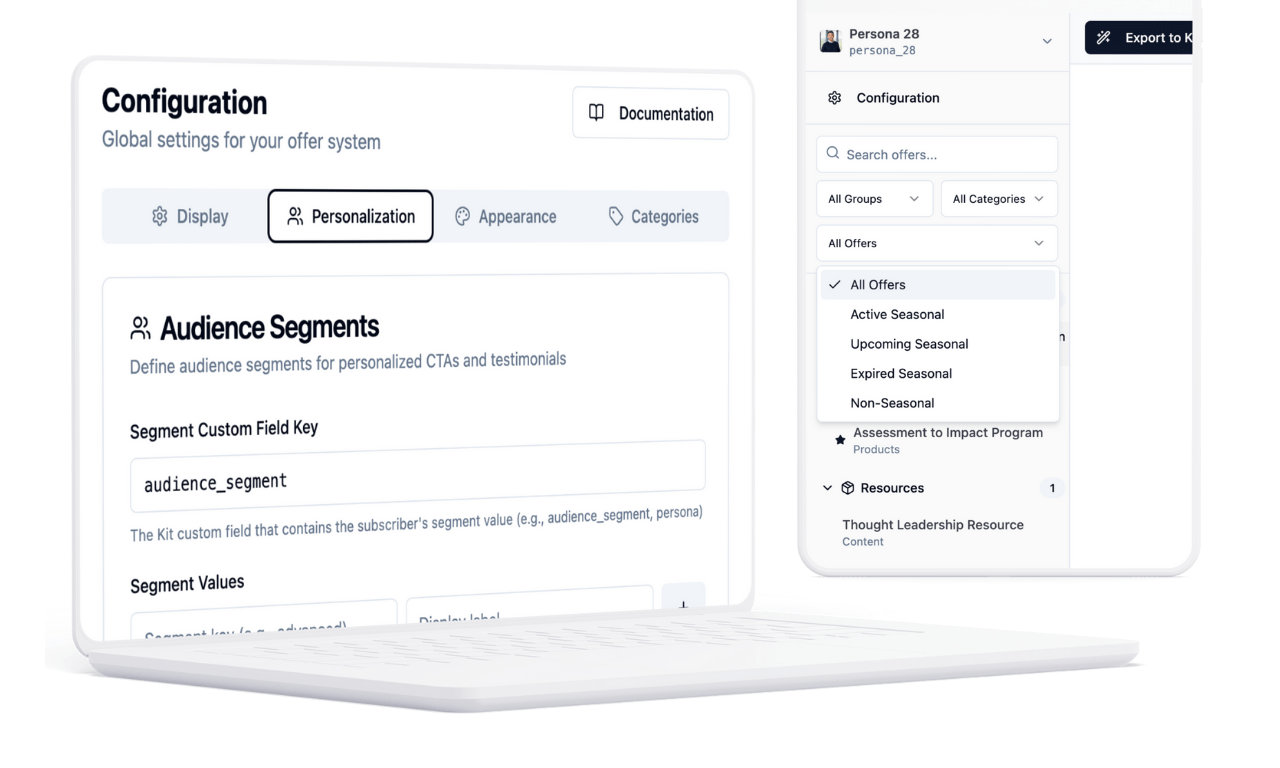
3. The Creator Engine App (The Control Panel)
This is how Derek manages it all without touching code.
We built an internal app that generates bulletproof Liquid logic based on simple inputs. Derek (or any client with Creator Engine access) logs in and can:
- Add, edit, or remove offers (primary, secondary, seasonal)
- Update CTA copy and messaging
- Swap testimonials by segment
- Set exclusion rules (don’t show X to people who bought Y)
- Adjust display frequency
- Preview exactly what each subscriber segment experiences
The app automatically generates the Liquid code. Derek copies it, pastes it into Kit, and it works. No coding. No risk of breaking anything. Takes 2 minutes instead of 2 hours.
Some clients manage this themselves. Others just give us their offers and have us handle it. Either way, everyone saves time.
The Priority Logic
At any moment, only ONE primary CTA is eligible per subscriber:
- Service consultation – when role + problem indicate readiness
- Assessment pathway – when evaluation or implementation clarity is needed
- Product/course checkout – when they’re a self-serve buyer
- No CTA escalation – continue value-only content
Critical feature: The system explicitly allows a “do nothing yet” state. If confidence is low, the correct action is patience, not persuasion.
That’s the point. The system feels seamless because the complexity is handled behind the scenes—by automations, code, and an app that’s been battle-tested across years of client work.
The Creator Engine App (Our Secret Weapon)
This is what most agencies don’t have, and no creators (other than our clients) have.
I spent years writing custom Liquid code for client builds—dynamic offer logic, personalized CTAs, segment-specific testimonials, conditional content blocks. Every client got custom code, and it worked… but I was starting from scratch every time.
The problem: Liquid is powerful but fragile. One misplaced character breaks the entire email. One logic error and the wrong offer shows to the wrong person. Debugging took hours. Scaling was a nightmare.
So I built an internal app for my agency.
Why Custom Liquid Logic Is Both Powerful… and a Total Nightmare
Here’s what makes this system work. RightMessage captures survey data and syncs it to Kit as custom fields. Our Kit automations check and update these fields constantly. Then our Liquid code reads those fields at send time to personalize every email dynamically.
For example, here’s simple personalization:
{% if subscriber.q_primary_focus == "succession_planning" %}
  If your assessment tools don't predict performance, your succession decisions are built on sand.
{% elsif subscriber.q_primary_focus == "executive_coaching" %}
  If your assessments don't predict performance, your coaching is built on the wrong foundation.
{% else %}
  If your assessments don't predict performance, your decisions lack scientific validity.
{% endif %}
That’s manageable. Three segments, one conditional block. Easy.
Now let’s add offer logic based on audience segment:
{% if subscriber.audience_segment == "strategic_decision_maker" %}
  {% if subscriber.q_primary_focus == "succession_planning" %}
    Book an Executive Leadership Conversation to evaluate whether your succession approach is defensible.
  {% elsif subscriber.q_primary_focus == "executive_coaching" %}
    Book an Executive Leadership Conversation to discuss high-impact coaching that proves ROI.
  {% elsif subscriber.q_primary_focus == "assessments_implementation" %}
    Discuss Leadership Assessments that actually predict executive performance.
  {% else %}
    Book a conversation to discuss your leadership development approach.
  {% endif %}
{% elsif subscriber.audience_segment == "education_first_buyer" %}
  Explore the Assessment to Impact Program to build your team's advisory capabilities.
{% else %}
  Book a conversation to explore how we can support your goals.
{% endif %}
Okay, now we’re at two levels deep. Still readable… barely.
Now let’s add exclusion logic (don’t show offers they already bought):
{% if subscriber.audience_segment == "strategic_decision_maker" %}
  {% unless subscriber.tags contains "purchased_executive_leadership" %}
    {% if subscriber.q_primary_focus == "succession_planning" %}
      Book an Executive Leadership Conversation to evaluate whether your succession approach is defensible.
    {% elsif subscriber.q_primary_focus == "executive_coaching" %}
      Book an Executive Leadership Conversation to discuss high-impact coaching that proves ROI.
    {% elsif subscriber.q_primary_focus == "assessments_implementation" %}
      {% unless subscriber.tags contains "purchased_leadership_assessments" %}
        Discuss Leadership Assessments that actually predict executive performance.
      {% else %}
        Book a conversation to explore additional support.
      {% endunless %}
    {% else %}
      Book a conversation to discuss your leadership development approach.
    {% endif %}
  {% else %}
    {% unless subscriber.tags contains "purchased_leadership_assessments" %}
      Discuss Leadership Assessments that actually predict executive performance.
    {% else %}
      Thank you for being a valued client. Reply anytime if you need support.
    {% endunless %}
  {% endunless %}
{% elsif subscriber.audience_segment == "education_first_buyer" %}
  {% unless subscriber.tags contains "purchased_assessment_course" %}
    Explore the Assessment to Impact Program to build your team's advisory capabilities.
  {% else %}
    Book a conversation to discuss next steps in your development.
  {% endunless %}
{% else %}
  Book a conversation to explore how we can support your goals.
{% endif %}
We’re now three levels deep with nested conditions checking:
- Custom field from RightMessage (
q_primary_focus,audience_segment) - Tags from Kit automations (
purchased_executive_leadership,purchased_leadership_assessments) - Multiple fallback scenarios
And we’re only handling three offers with basic exclusion logic.
Now imagine:
- 5 primary offers
- 3 secondary offers
- 2 seasonal offers
- Segment-specific testimonials for each
- Date-based logic (expire old offers, activate new ones)
- Multi-level exclusions (purchased X, currently enrolled in Y, tagged with Z)
You’d be looking at 300-500 lines of nested Liquid code for a single dynamic CTA block.
One typo—one missed {% endif %}—and the entire email breaks. One logic error and you’re pitching executive coaching to someone who already bought it.
And here’s the nightmare: every time Derek wants to add a new offer, update CTA copy, swap a testimonial, or adjust targeting… someone has to dive into this code, find the right conditional block, modify it without breaking anything else, and test every possible subscriber path.
It’s borderline emotional abuse to expect clients to manage this. Hell, even I don’t want to manage this anymore—and I wrote it.
How the Creator Engine App Solves This
The app takes all of this complexity and hides it behind a simple form.
Derek logs in, clicks “Add New Offer,” and fills out:
- Offer name: Executive Leadership Conversation
- Target segment: Strategic Decision-Maker
- Primary focus: Succession Planning
- CTA copy: “Book an Executive Leadership Conversation to evaluate whether your succession approach is defensible.”
- Exclude if: Has tag
purchased_executive_leadership - Testimonial (optional): CHRO testimonial about succession planning
The app generates all the Liquid logic automatically—with proper nesting, fallbacks, exclusions, and error handling.
Derek copies it, pastes it into his Kit snippet, and it just works.
How collaboration actually works:
My agency and I have admin access. Clients are given permission-based access to their workspace.
That means:
- When they make updates, we can see them in real-time
- If they need help, we can debug and modify alongside them
- We can collaborate in tandem—they update offers, we handle the technical deployment
- Some clients prefer to manage everything themselves (they can)
- Other clients just input their data and have us handle the rest (we can)
The workflow is stupid simple:
Client adds a new offer (or we add it for them). They fill in:
- Offer name
- Target segment
- CTA copy
- Testimonial (optional)
- Exclusion rules (optional)
The app automatically generates the Liquid code. Then either:
- They copy it, paste it into their Kit snippet, and they’re done
- Or they ping us and we handle it
Takes maybe 2 minutes instead of 2 hours of custom coding.
Why this matters:
In the past, once we delivered custom Liquid code to a client, updates were a complete nightmare.
Want to add a new offer? I’d have to:
- Write new Liquid logic
- Test it in a sandbox
- Debug inevitable syntax errors
- Manually copy/paste into Kit snippets
- Re-test to make sure nothing broke
- Do it again if they wanted changes
That process could take 2-4 hours per offer change. And clients couldn’t do it themselves—they’d have to pay us or just live with outdated content.
(And sure, AI makes all of this even more possible and fast — but it still generates different code every single time.)
Now? Derek (or any client with Creator Engine access) can add or update offers in under 10 minutes. No code. No risk of breaking anything. No waiting on us.
And if they want us to handle it? We can update everything on our end just as fast.
Everyone saves time.
How we built it:
This app is the result of hundreds of hours across dozens of client projects—testing, debugging, refining, and codifying patterns that work.
Every feature in the app exists because I encountered a client need, wrote custom code to solve it, then systematized that solution so I’d never have to reinvent it.
- Offer exclusion logic? Built after a client accidentally pitched someone who’d already bought.
- Seasonal offers? Built after a Black Friday campaign needed temporary CTAs without breaking the evergreen system.
- Segment-specific testimonials? Built after realizing generic social proof doesn’t convert high-ticket buyers.
The app doesn’t just generate code—it generates reliable code based on real-world use cases, edge cases, and psychological principles.
And our clients just get access to it.
Derek didn’t pay extra for this. It’s part of how we deliver Authority Engine builds. The app is continuously updated, improved, and expanded based on what we learn from every new client.
One past client described the experience this way:
“I love seeing how your mind works. It’s like watching a dialed-in symphony.”
That’s the point. The system feels seamless because the complexity is handled behind the scenes—by an app that’s been battle-tested across years of client work.
Derek gets world-class personalization infrastructure without needing to understand (or maintain) any of it.
You don’t get this anywhere else. Most email marketing agencies, or freelancers who can string together automations in Kit, deliver custom code once, then leave you stuck. We deliver custom code and the tool to manage it forever.
Reactivating 2,000 Past Contacts (Without Breaking CAN-SPAM)
Here’s where most consultants with an existing contact list get stuck.
Derek had nearly 2,000 contacts sitting in a spreadsheet: current clients, past clients (warm and cold), partners, collaborators, people he’d hired, people he’d worked with. Real relationships. But no permission to email them marketing content.
The problem: You can’t just import 2,000 people and start blasting newsletter content. That violates CAN-SPAM. But you also can’t manually invite 2,000 people one by one. That’s not realistic.
The solution: We designed a permission-based reactivation campaign that any consultant can replicate.
How We Did It
Step 1: Isolate the campaign
We created a completely separate email sequence that lives outside Derek’s main newsletter system. These contacts won’t receive any automated welcome emails, pitch sequences, or newsletter content until they explicitly opt in.
Step 2: Map the data
Derek had valuable context about these relationships:
- Current client vs. past client
- Warm lead vs. cold lead
- Partner or collaborator
- Company name
- Nature of previous engagement
We mapped all of this to custom fields in Kit so we could personalize the reactivation emails.
Step 3: Create a highly personalized, text-only invitation
This wasn’t a marketing email. It was a personal invitation that felt like Derek sat down and wrote it to each person individually.
The email was personalized by:
- Their name
- Their company
- Their working relationship with Derek
- Why the newsletter would be relevant to them specifically
Example structure:
“Hi [Name],
It’s been a while since we [worked together at Company X / connected about succession planning / etc.]. I’m reaching out because I’ve started a weekly newsletter for [their segment—CHROs, talent leaders, etc.] and thought it might be relevant given [specific context about their role or previous conversation].
Each week I share [specific value based on what we know about them]. If that sounds useful, you can join here: [Link]
If not, no problem at all—just ignore this email.
— Derek”
Step 4: Use a link trigger for instant confirmation
When someone clicked the “join here” link, it:
- Auto-confirmed them into the main newsletter system
- Sent them to the post-opt-in thank you page with the RightMessage survey
- Started the personalized welcome sequence based on their survey responses
This meant they were segmented and personalized from moment one—just like a brand new subscriber.
Step 5: One gentle follow-up
Three days later, we sent one final follow-up to non-responders:
“Hi [Name],
Quick follow-up on my last email. I’m about to stop emailing about the newsletter, but wanted to extend the invite one more time before I do.
If you’d like to join, here’s that link again: [Link]
If not, that’s totally fine. You can either ignore this email or click here to unsubscribe and I’ll stop emailing immediately.
— Derek”
Respectful. No pressure. Clear options.
The Results
Out of nearly 2,000 contacts, Derek converted approximately 50% into engaged newsletter subscribers.
That’s roughly 1,000 people who:
- Explicitly opted in
- Completed the segmentation survey
- Entered the personalized welcome sequence
- Started receiving the right offers based on their stated needs
Derek went from having essentially no active email list to having 1,000+ segmented, engaged subscribers ready to receive personalized content.
Why This Works (And Why Most Reactivation Campaigns Don’t)
Most reactivation emails fail because they:
- Feel generic and mass-produced
- Don’t acknowledge the existing relationship
- Jump straight into sales pitches
- Don’t give people a clear, easy way to opt out
This approach works because:
- It’s genuinely personalized (not just “Hi {{first_name}}”)
- It respects the relationship context
- It’s an invitation, not a pitch
- It makes opting in effortless (one click via link trigger)
- It makes opting out equally easy
- It’s fully CAN-SPAM compliant (clear sender, clear unsubscribe, no deception)
The key insight: These aren’t cold leads. They’re warm contacts who already know Derek. They just need permission to email them and a reason to say yes.
The Technical Execution: What Makes This Work
Smart Segmentation Routing
When someone completes the RightMessage survey:
- Their answers sync to Kit as tags and custom fields
- Their “next offer” is calculated automatically
- They’re routed into the appropriate welcome sequence variation
- All future emails adapt based on their data
Example flow:
CHRO interested in succession planning gets personalized welcome emails, then after 3 days enters evergreen newsletter with succession-focused CTAs, then after 90 days gets pitched Executive Leadership consultation, then back to newsletter.
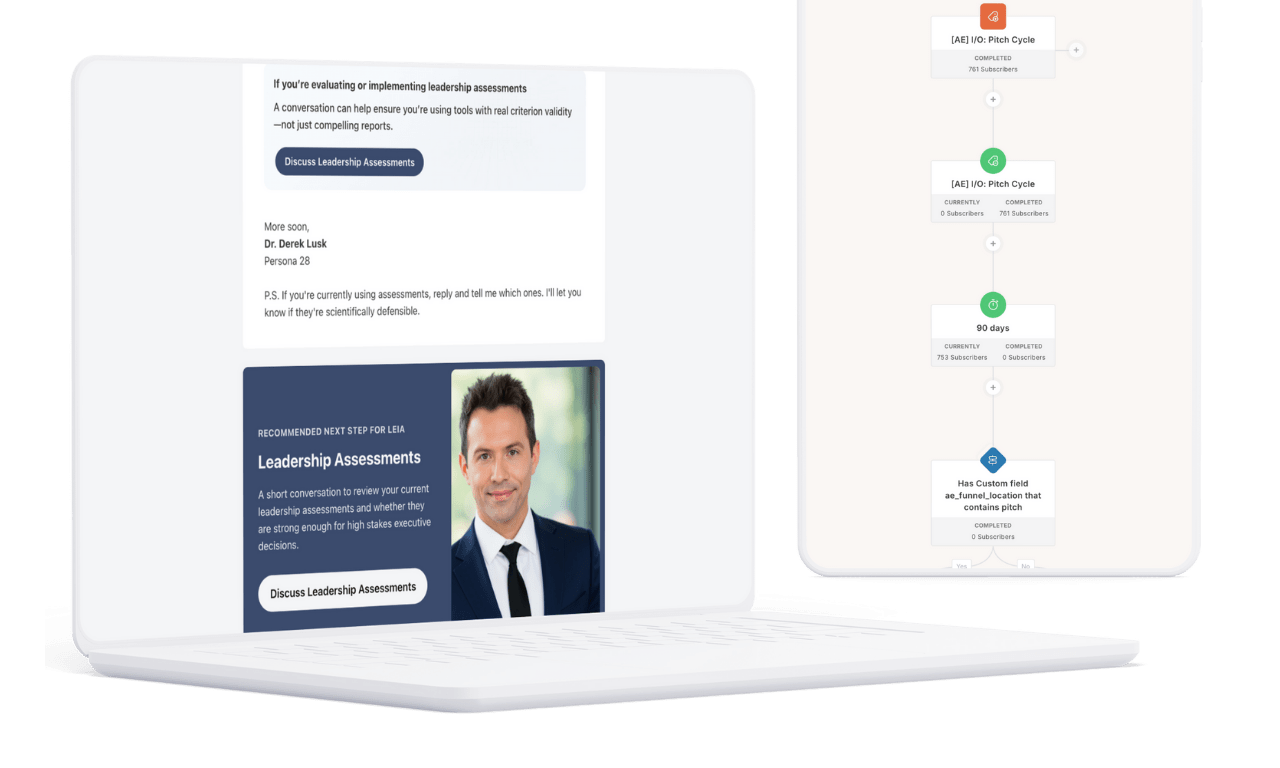
Personalized Newsletter in Kit
Every personalized newsletter email follows strategic personalization principles:
We adjust problem framing based on context. For example, when Derek discusses assessment validity, a CHRO focused on succession planning sees: “This matters for succession planning because the assessments you use directly shape who gets promoted and who doesn’t.”
Someone focused on executive coaching sees different framing: “If your assessments don’t predict performance, your coaching is built on the wrong foundation.”
Same core content. Different context. Feels like it was written specifically for them.
The Double Opt-In Problem (And Our Solution)
Most email platforms recommend double opt-in: when somebody joins your list, they receive an email asking them to confirm their subscription.
The problem: This creates a huge risk. The confirmation email might:
- Take too long to arrive
- Land in spam or junk folders
- Get buried in their inbox
- Arrive after they’ve forgotten who you are
Worse: subscribers who never confirm remain in “unconfirmed” status forever. You can’t email them. You can’t remind them to confirm. They’re stuck in limbo.
Our solution: Single opt-in with smart engagement tracking
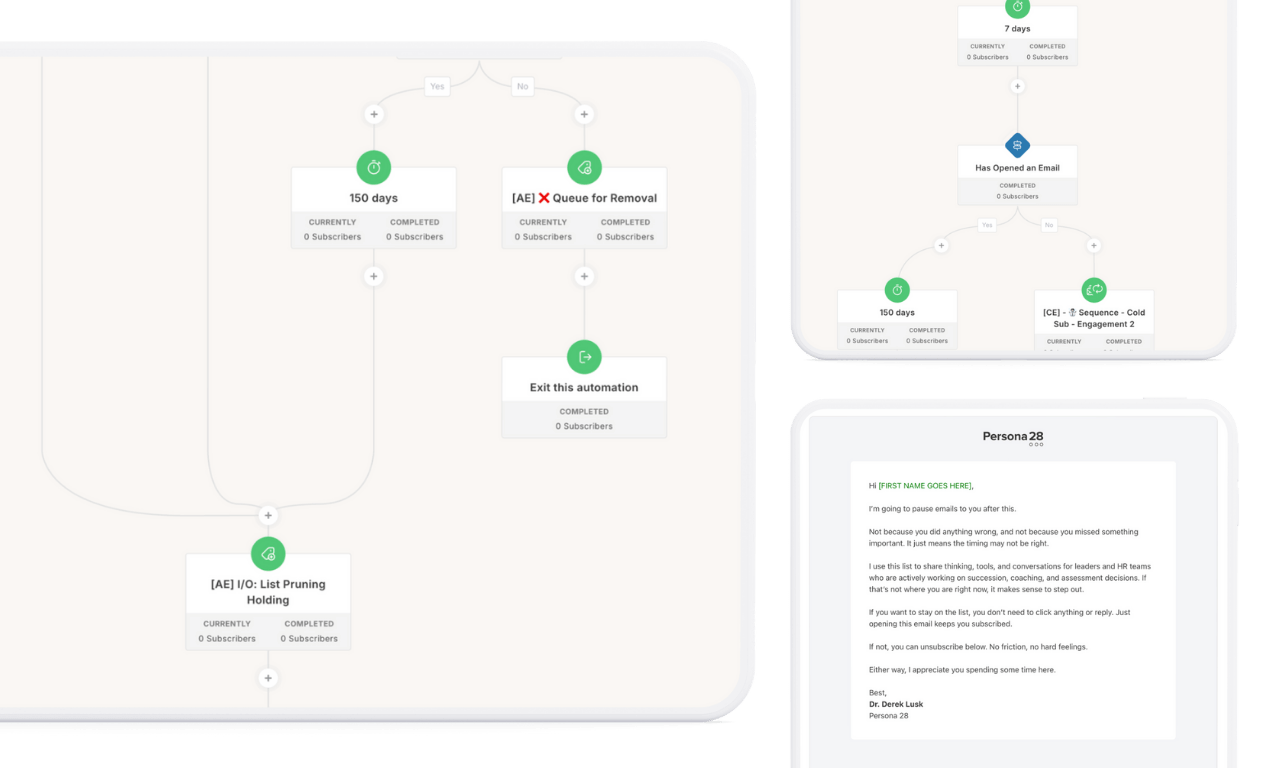
We make all our systems single opt-in but hold subscribers in our auto list pruning automation, which perpetually checks engagement.
For new subscribers:
- 30 days to confirm by opening emails
- If they’ve opened and engaged: they’re in
- If not: we send a re-engagement check
- Still no opens: automatic unsubscribe
For existing subscribers:
- The automation runs twice a year for everyone
- Ensures the entire list stays engaged
- Protects deliverability and sender reputation
This solves the double opt-in problem while maintaining a healthy, engaged list.
High-Intent Visitor Tracking
Using RightMessage website tracking:
- If someone visits the contact page 3+ times in 7 days but doesn’t book
- They get tagged as high-intent, no booking
- Their next scheduled email includes a gentle P.S. nudge
- Tag auto-removes when they book or stop visiting
Result: High-intent visitors get helpful prompts without extra email sends.
The Handoff: Operationalizing the System
We don’t just build systems and disappear. We ensure Derek can operate this himself.
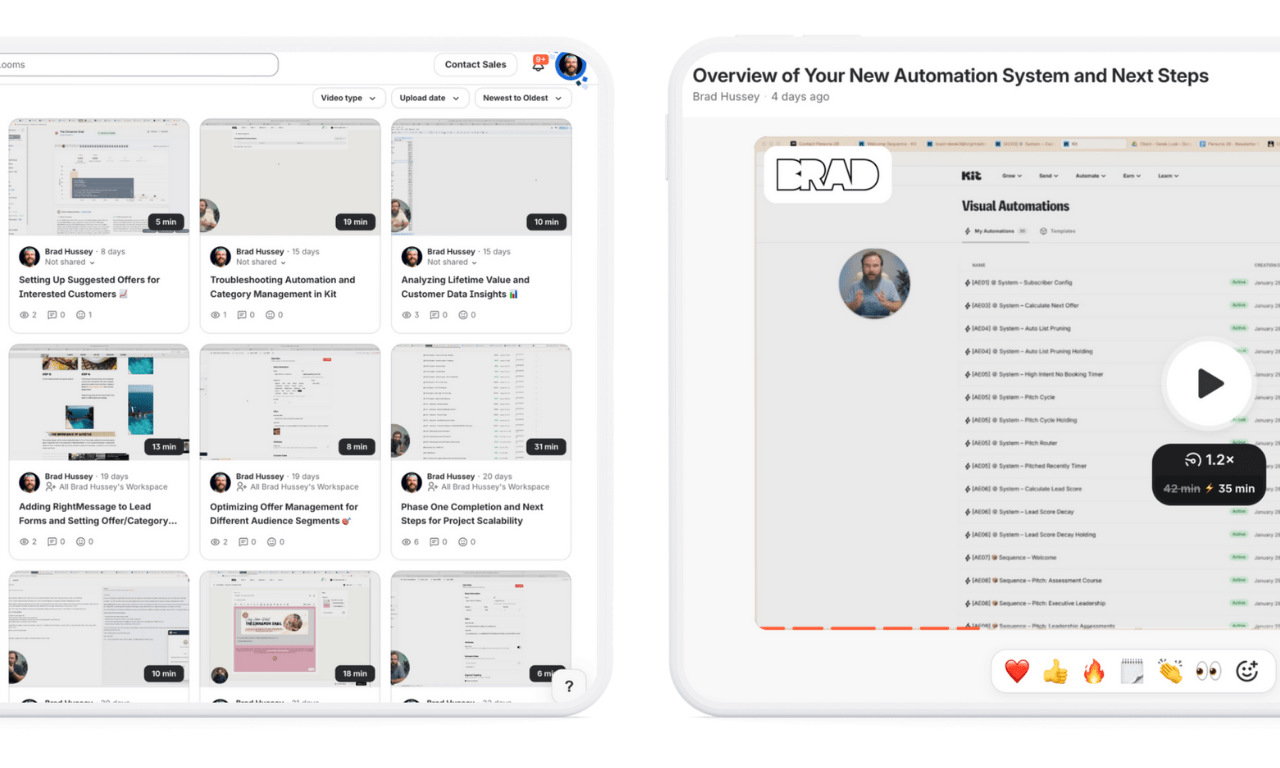
Deliverables Included:
- Recorded Walkthrough — Full system explanation (what’s built, how it works, what to update)
- SOP Documentation — Newsletter personalization standards, offer management, segment logic
- 30 Days of Support — Bug fixes, clarifications, optimization guidance
What Derek Can Now Do:
- Add new evergreen newsletter pieces (just drop in content)
- Update offer copy and CTAs (via Creator Engine app)
- Modify survey questions (if audience needs change)
- See segmentation analytics (who’s on his list, what they want)
- Run tests and optimizations (A/B test subject lines, CTA variations)
The Transformation: Before vs. After
Before:
- Basic Kit opt-in form
- Single generic follow-up email
- No segmentation or personalization
- No systematic email strategy
- 20+ published thought leadership pieces sitting unused
- No clear path from subscriber to conversion
After:
- Every subscriber segmented immediately upon opt-in via RightMessage survey
- 3 personalized welcome emails (customized by role and focus)
- 3 personalized pitch sequences (one per offer)
- 20-week evergreen newsletter with dynamic CTAs
- Automated offer routing based on stated needs
- 90-day re-pitch cycle with frequency capping
- Perpetual engagement tracking and list health management
- Clear, data-driven conversion paths
What This Means for Derek’s Business:
Better Qualified Conversations
When someone books a call, Derek already knows their role, their focus, and what they’ve engaged with. Consultations start at a higher level.
Predictable Pipeline
The re-pitch cycle ensures regular offer exposure without annoying subscribers. Every 90 days, the right people see the right offer again.
Authority Positioning
The evergreen newsletter keeps Derek top-of-mind as the expert in executive leadership science — not through volume, but through relevance.
Scalable Personalization
What used to require manual list management and separate campaigns now happens automatically. Derek focuses on thought leadership; the system handles distribution.
The Lessons: What Makes Automated Email Newsletters Work
1. Segment by Behaviour AND Intent
Role alone isn’t enough. Problem focus alone isn’t enough. You need both to route effectively.
2. Personalize Strategically, Not Cosmetically
Don’t just insert merge tags. Adjust problem framing, proof selection, and CTA positioning based on who’s reading.
3. One CTA Per Subscriber
Multiple competing options create cognitive load. Show them the ONE thing that makes sense for them right now.
4. Allow “Do Nothing Yet” States
Not every subscriber is ready to buy. Give them value-only content until confidence increases.
5. Voice Matching is Non-Negotiable
Promotional copy that doesn’t match the consultant’s natural voice gets rejected by subscribers who recognize the mismatch.
Who This Build Is For
This automated email newsletter system works for:
- High-ticket consultants with multiple service offerings
- Executive coaches serving diverse client types
- Boutique firms with sophisticated audiences
- Thought leaders who publish regularly but lack distribution infrastructure
- Anyone with a list of 1,000-50,000 who’s ready to move beyond generic blasts
It’s not for:
- Early-stage creators still figuring out their offer
- Businesses with one product and one audience (no segments to personalize)
- People who want us to write all their content (we build systems, not ghostwrite)
The Bottom Line
Derek didn’t need more content. He didn’t need a bigger list. He didn’t need another certification or credential.
He needed architecture.
A personalized newsletter system in Kit that:
- Knows who each subscriber is
- Understands what they need
- Routes them to the right offer
- Does it automatically, perpetually, without manual intervention
That’s what we built in 2 weeks.
Interested in an automated email newsletter system for your consulting practice?
If you’re a high-level consultant, executive coach, or boutique firm with:
- Multiple offers or services
- A diverse audience (different roles, needs, or stages)
- Published content sitting unused
- A list that isn’t converting like it should
Let’s talk.